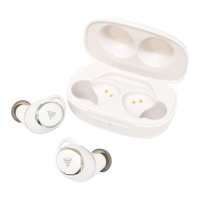
Basicoperations
*Instructionmaychangewhensoftwareupdates.Pleaseensure
up-to-dateinstructionatFAQinhomepageand/orapps.
Poweringoperation
PowerON: RemoveearphonessetfromchargingcaseorpressMFButton,LEDlight
turnsinblueandthenpowerturnson.
PowerOFF: PressandholdMFButtonin5secs,LEDlightturnsinredandthenpower
turnoff.
Stand-by: Chargingmaystartassoonasearphonessetisstoredinchargingcase
Charging
1.Chargingearphonesset:Oncestoreearphonessetincharging case,andchargingautomatically
startswithredLEDlightturningon.Chargingtimeisapproxim ately2hourstofinishcharging.
*actualtimeofchargingmaychangeuponconditions
2.Chargingchargingcase:OncechargingcaseisconnectedtoU SBchargerwithenclosedUSB
cable,chargingautomaticallystartswithredLEDlightturning on.Chargingmayfinishonceyellow/
greenLEDturnson
*actualtimeofchargingmaychangeuponconditions
Pairingoperation
Startpairing Removebothearphonessetfromchargingcase.PressMFbuttont wice
quicklyandsubsequentlyholdMFButtonat3rdtime.Pairingmo deis
readyforconnectionwithsmartphoneonceblueandredLEDligh tsare
blinkingoneaftertheother.
Resetearphonesets PleasepressandholdbothLeft&RightMFbuttonin6secswhere
earphonessetisstoredinchargingcase,thenallpairinginfo rmation
isremovedandinitialized.
*Pairingmodeavailableonceturnpoweronafterreset.
*Chargingcaseshouldbechargedforresetprocess.


 To Next Page
 Loading...