EasyManua.ls Logo

ANJANK AC-190 - User Manual

ANJANK AC-190
17 pages
Print Icon
To Next Page IconTo Next Page
Loading...
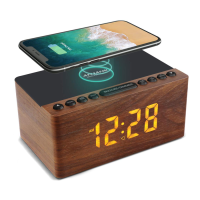
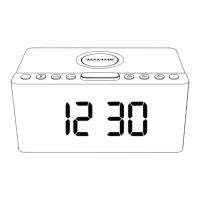
AC-190 Wireless Charging FM Radio Alarm Clock
Instruction Manual and Warranty
WIRELESS CHARGE
12/24H SLEEP
TIME
SET
AL
SET
AL
ON/OFF
SNOOZE/DIMMER
AM
Question and Answer IconNeed help?

Do you have a question about the ANJANK AC-190 and is the answer not in the manual?

Summary

Features

Power Specifications

Getting Started

Front View

Overview of the clock's front display and indicators.

Top View

Back View

Bottom View

12; 24 H Switch

Setting The Time

Setting The Alarm and Alarm Tone

Alarm On; Alarm Off

Using The Alarm And Snooze

Setting The Manual-scan Radio Station

Setting The Auto-scan Radio Station

Setting The Radio Alarm

Sleeper Timer Setting

Using The Wireless Charging Function

USB Charging Port

Display and Audio Features

Display Brightness Adjustment

Adjusts the display brightness to 5 levels for user preference.

Headphone Jack Support

Enables listening to FM radio privately using a 3.5mm headphone.

Support and Warranty Information

Email Support

Contact customer support via email for assistance with the clock.

Warranty

Details the 45-day money back and 18-month product warranty.

Overview

This document is the instruction manual and warranty for the ANJANK AC-190 Wireless Charging FM Radio Alarm Clock.

Function Description

The ANJANK AC-190 is a multi-functional alarm clock that integrates several features into a compact design. Its primary functions include:

  • Alarm Clock: Allows users to set alarms with options for beep or FM radio tones. It supports a 9-minute snooze function and the alarm can be silenced for the day or will automatically turn off after a set duration (5 minutes for beep, 1 hour for FM radio).
  • FM Radio: Features manual and auto-scan capabilities to find and store up to 30 FM radio stations. The radio volume can be adjusted via a slider on the back. It also includes a sleep timer function for the FM radio, allowing users to set the radio to play for a duration of 10 to 120 minutes before automatically turning off.
  • Wireless Charging: Equipped with a wireless charging pad on the top surface for compatible smartphones and devices.
  • USB Charging Port: Provides an additional USB-A port for charging other digital devices.
  • Time Display: Displays time in either 12-hour or 24-hour mode, with AM/PM indicators for the 12-hour format.
  • Display Brightness Adjustment: Offers 5 levels of LED display brightness (Full, High, Medium, Low, Dark) to suit user preference.
  • Headphone Jack Support: Includes a 3.5mm headphone jack for private listening of the FM radio.

Important Technical Specifications

  • Power Adaptor: AC100-240V, 50-60Hz; DC, 9V-2A 18W, Class 2.
  • Battery Backup: Requires two AAA batteries (not included) to preserve time and alarm settings during a power outage. Note that under battery power, the display goes blank and the alarm will not sound, but settings are saved. If batteries are removed and power is interrupted, settings will need to be reset.
  • Wireless Charging Output: 5W/7.5W/10W. Supports all enabled wireless charging devices or devices with a receiver (e.g., iPhone, Samsung, HUAWEI, and other smart phones). Provides fastest wireless charging speed for phones at 7.5W.
  • USB Charging Port Output: 5V/1A.
  • Snooze Duration: 9 minutes.
  • Alarm Tone Duration: Beep alarm (#01) lasts 5 minutes; FM radio alarm (#02) lasts 1 hour.
  • FM Radio Presets: Can save up to 30 channels.
  • Sleep Timer Settings: Adjustable from 10 to 120 minutes, with a default "off" state.

Usage Features

  • Setting Time: Press the "TIME SET" button, then use the up/down arrows to adjust the hour and minute. Press "TIME SET" again to confirm.
  • Setting Alarm: Press the "ALARM SET" button, then use the up/down arrows to adjust the alarm hour and minute. Press "ALARM SET" again to select the alarm ringtone (01 for beep, 02 for FM radio) using the up/down arrows. Press "ALARM SET" one more time to end setup. The alarm icon will appear on the display when activated.
  • Alarm On/Off: The alarm is automatically turned on after setting. Press the "ALARM ON/OFF" button to toggle the alarm off (the alarm icon will disappear).
  • Snooze: When the alarm rings, press the "SNOOZE" button to activate a 9-minute snooze.
  • Silencing Alarm: To silence the alarm (without snoozing), press any button except "SNOOZE". The alarm will reset for the next day.
  • FM Radio Operation:
    • Turn On/Off: Press the FM radio button (labeled with a radio icon) to turn the radio mode on or off.
    • Manual Scan: When the radio is on, use the up/down arrows to manually select a channel.
    • Auto Scan: Long press the FM radio button to auto-scan and store stations. Then use the up/down arrows to select a favorite channel from the stored presets.
    • Radio Volume: Adjust using the volume slider on the back of the clock.
  • Setting Radio Alarm: When the radio is on and a desired channel is selected, long press the "SNOOZE / DIMMER" button until "AL" blinks on the display. This saves the current channel as the second alarm ringtone (02).
  • Sleep Timer: When the radio is on, press the "SLEEP" button to cycle through sleep timer durations (10, 20, 30, 40, 50, 60, 70, 80, 90, 100, 110, 120 minutes) or select "00(OFF)" to disable.
  • Wireless Charging: Place a compatible phone on the center of the wireless charging pad. The phone will light up to indicate charging.
  • Display Brightness: Press the "SNOOZE / DIMMER" button to cycle through 5 levels of display brightness.
  • 12/24H Switch: Press the "12/24H" button to switch between 12-hour and 24-hour time modes.
  • Headphone Use: Plug a 3.5mm headphone into the headphone jack for private listening.

Maintenance Features

  • Battery Backup: Install two AAA batteries (not included) in the battery compartment on the bottom to maintain time and alarm settings during power outages.
  • FCC Compliance: The device complies with Part 15 of the FCC Rules for Class B digital devices. Users are advised on measures to correct potential radio or television interference, such as reorienting the antenna, increasing separation from the receiver, connecting to a different circuit, or consulting a technician.
  • Warranty: ANJANK offers a 45-day money-back guarantee and an 18-month warranty for the product.
  • Email Support: For any questions or issues, customers can contact the support team at customer01@kerchanstar.com for assistance within 24 hours.
  • Video Support: An instructional video is available via a QR code or URL (https://www.youtube.com/watch?v=-zi590A8wGU) for smoother operation.

ANJANK AC-190 Specifications

General IconGeneral
BrandANJANK
ModelAC-190
CategoryAlarm Clock
LanguageEnglish

Related product manuals