
 Need help?
Do you have a question about the ANJANK AC-199 and is the answer not in the manual?
Specifies the power input requirements for the device.
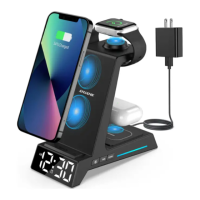
Supports charging for phones, watches, and headphones.
Includes 9-min snooze, adjustable volume, and display dimmer.
Supports 12/24H mode and battery backup for settings.
Lists charging station, USB-C cord, adapter, manual, and battery.
Labels buttons like Alarm, Time, Up, Down, Snooze.
Highlights pads for watch and phone wireless charging.
Shows USB-C port, indicator light, dimmer, and heat dissipation holes.
Indicates the specific area for wireless headphone charging.
Locates the Alarm On/Off and Alarm Set buttons on the left side.
Shows model, power specs, and battery compartment details.
Guide for plugging in the adapter and removing the battery tab.
Notes on blank display, battery power limits, and reset procedures.
Instructions to switch between 12-hour (AM/PM) and 24-hour formats.
Steps to enter hour setting and adjust the hour using +/- buttons.
Steps to confirm hour and adjust the minute using +/- buttons.
Procedure to set the desired alarm hour using +/- buttons.
Procedure to set the desired alarm minute using +/- buttons.
Adjusting alarm volume level (U1, U2, U3) and confirming.
Using the ALARM ON/OFF button, indicated by an icon.
Options to stop ringing alarm or activate snooze for 9 minutes.
How to cycle through 1-6 brightness levels using the sun icon button.
Instructions for correct placement and indicator light behavior during charging.
Notes on foreign objects, protective cases, and headphone orientation.
Lists compatible devices for wireless charging.
Instructions for CR2025 battery and its use for settings only.
Details the one-year warranty and contact email for issues.
States compliance with FCC rules regarding harmful interference.
Requirements for antenna installation and separation distance for RF exposure.
 General
| Brand | ANJANK |
|---|---|
| Model | AC-199 |
| Charging Slots | 4 |
| Battery Type | Ni-MH, Ni-Cd |
| Input | AC 100-240V, 50/60Hz |
| Features | Short circuit protection |

 To Next Page