05 06
Connecting
with Your Car
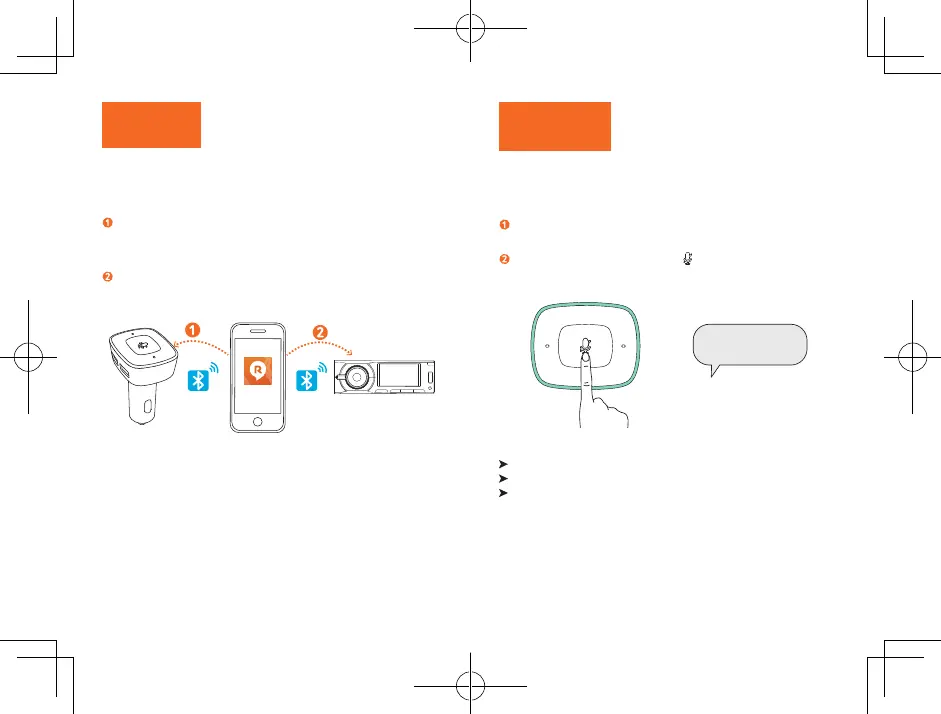
Follow the on-screen instructions in the
Roav VIVA
app to complete the
Bluetooth connection:
Connect Roav VIVA with the Roav VIVA app via Bluetooth.
Connect your smartphone with the car stereo via Bluetooth.
Using Roav VIVA
with Alexa
Roav VIVA comes with a voice service feature. You can play music,
get navigation directions, manage everyday tasks, easily control
smart devices around you by using your voice.
Follow the on-screen instructions in the Roav VIVA app to login
with your Amazon account.
To activate the voice service, press or say the wake word
“Alexa”
first and then your request.
Alexa, .......
Roav VIVA will respond instantly.
To learn more proper commands to ask Alexa, read the Skills Cards.
To explore more skills with Alexa, go to
www.amazon.com/MeetAlexa
and download the Amazon Alexa app on your iOS or Android device.


 To Next Page