EasyManua.ls Logo

Anker 712 - User Manual

Anker 712
2 pages
Print Icon
To Next Page IconTo Next Page
Loading...
USER MANUAL
Using Your Product
DE: Verwendung Ihres Produkts ES: Uso del producto
FR: Utilisation de votre produit IT: Uso del prodotto
PT: Usando seu produto RU: Использование изделия
TR: Ürününüzü Kullanma JP: 本製品の使用方法
KO: 제품�사용하기 简中: 使用产品
繁中:使用您的產品
רצומב שומ :HE كﺟﺗﻧﻣ مادﺧﺗ :AR
Product Number: Y2111 51005003106 V01
For FAQs and more information, please visit:
anker.com/support
@Anker Deutschland
@Anker Japan
@Anker
@AnkerOcial
@Anker_JP
@anker_ocial
@anker_jp
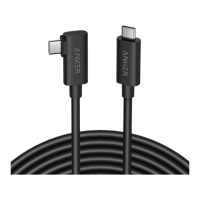
Anker 712 USB-A to USB-C Cable
(16ft Fiber Optic for Oculus)
Question and Answer IconNeed help?

Do you have a question about the Anker 712 and is the answer not in the manual?

Summary

Using Your Product

Connect VR Headset and PC

Connect the USB-C to VR glasses and USB-A to PC for operation.

Cable Attachment

Fasten Cable with Included Fastener

Use the included fastener to secure the cable for better management.

Summary

Using Your Product

Connect VR Headset and PC

Connect the USB-C to VR glasses and USB-A to PC for operation.

Cable Attachment

Fasten Cable with Included Fastener

Use the included fastener to secure the cable for better management.

Anker 712 Specifications

General IconGeneral
CategoryCables and connectors
Connector TypeUSB-C to USB-C
Data Transfer Speed480Mbps
Power Delivery60W
ColorBlack
ModelAnker 712
CompatibilityUSB devices
MaterialNylon