EN 0201 EN
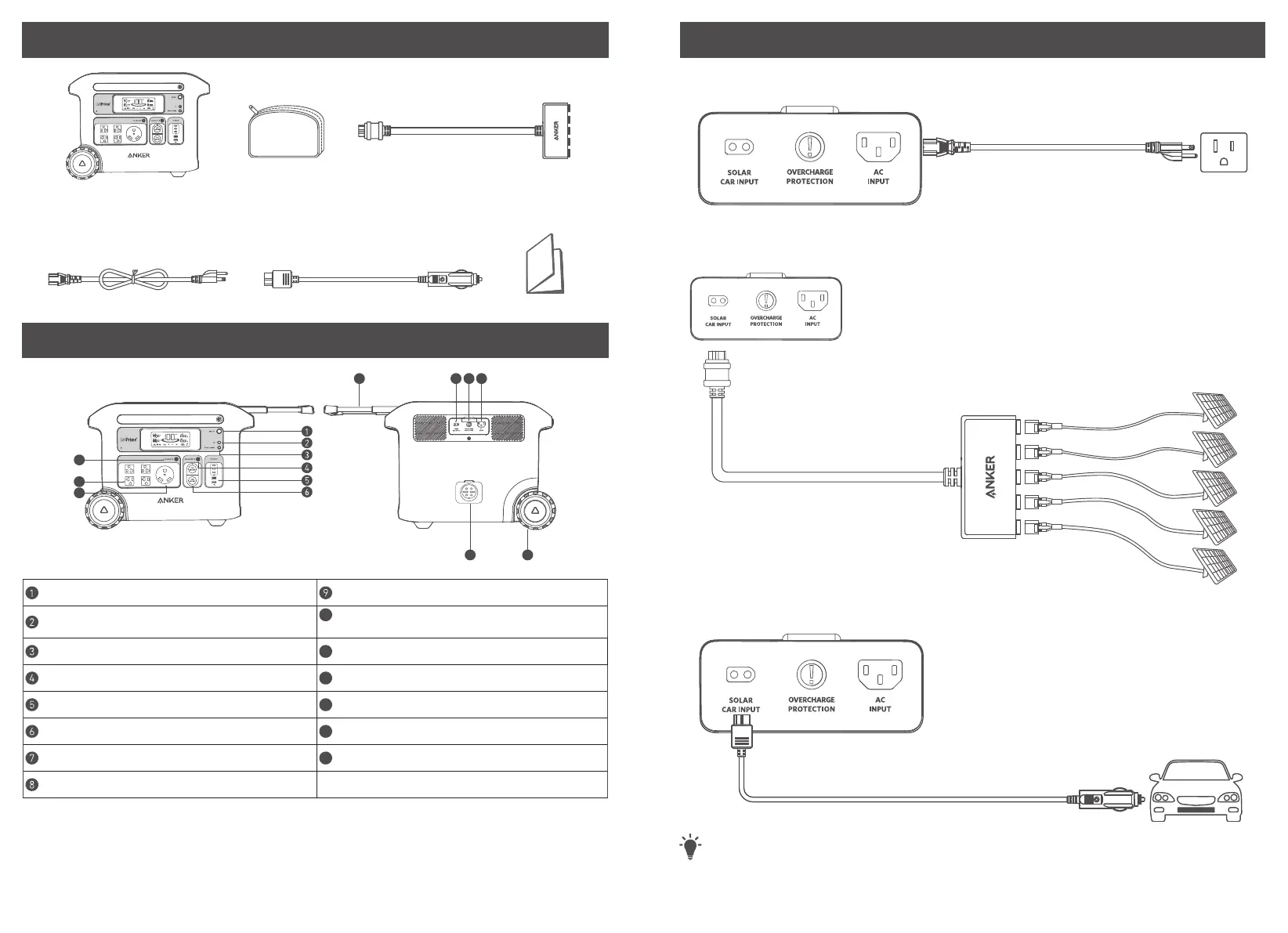
What's in the Box
Solar Charging Cable
Anker 767 Portable Power
Station
AC Charging Cable Car Charging Cable
Accessories Bag
Overview
Display Button
AC Outlet Button
IoT Button
10
Retractable Handle (Press the button on the
retractable handle and pull to extend)
Power Saving Button
11
Solar Input and Car Input
Car Socket Button
12
Overcharge Protection
USB Ports
13
AC Input Port
Car Sockets
14
Wheel(s)
TT-30R AC Output Port
15
Expansion Battery Port
NEMA-20R AC Output Ports
User Manual
Recharging Your Power Station
AC recharging (1440W Max)
Recharge your power station by connecting to a wall outlet with the AC charging cable.
Solar Panel Recharging (1000W Max)
Recharge your power station with a maximum solar input of 1000W by connecting up to five Anker 531 Solar
Panels (200W) as shown in the figure with a solar charging cable.
Car Recharging
Recharge your power station by connecting to a car's output port with the car charging cable.
T
· When your portable power station only has 1% battery remaining, the "Remaining Battery" indicator will
flicker to remind you to recharge.



 To Next Page