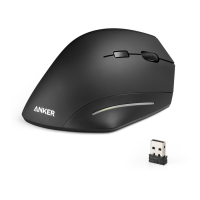
This document is the user manual for the Anker Wireless Vertical Mouse, model number 98ANWVM-UBA, version 0.1, dated 2017.05.16. It provides detailed information on the mouse's electrical specifications, button functions, operation process, and important cautions, along with FCC compliance statements.
The Anker Wireless Vertical Mouse is designed for comfortable and efficient computer navigation. Its vertical design aims to reduce wrist strain, promoting a more ergonomic user experience. The mouse operates wirelessly, connecting to a computer via a USB transceiver.
Important Technical Specifications:
- Operating Voltage: The mouse requires 3V for operation, supplied by two AAA batteries.
- Current Consumption: During active use, the mouse consumes less than 10mA.
- Sleep Mode: To conserve battery life, the mouse enters a sleep mode with an electrical current consumption of less than 1mA. It can be woken up by pressing any button.
- Mouse Pointer Performance:
- Resolution: The mouse offers adjustable DPI settings: 800, 1200 (default), and 1600 DPI, allowing users to customize pointer sensitivity.
- Speed: It can achieve a maximum speed of 25 inches per second.
- Acceleration: The mouse supports an acceleration of 8G.
- Wireless Specifications:
- Frequency Coverage: The mouse operates within the 2.408-2.474GHz frequency range.
- Transceiver Type: It utilizes a GFSK RF transceiver for wireless communication.
- Data Rate: The high-speed RF link supports a maximum data rate of 1M bit/s.
- LED Indicating Functions: The mouse includes an LED indicator. When the battery voltage drops below 2.1V, indicating low battery power, the LED will glisten at a frequency of 1Hz to alert the user.
The Anker Wireless Vertical Mouse is equipped with seven distinct buttons, each serving a specific function to enhance user productivity:
- Left Button: Standard mouse left-click function.
- Right Button: Standard mouse right-click function.
- Middle Button: Standard mouse middle-click function.
- Wheel: Functions as a standard mouse scroll wheel for navigating documents and web pages.
- 4 Button: Dedicated for "IE Forward" function, typically used for navigating forward in web browsers.
- 5 Button: Dedicated for "IE Back" function, typically used for navigating backward in web browsers.
- DPI Button: Allows users to regulate and switch between the available DPI settings (800/1200/1600 DPI) to adjust pointer speed and precision.
Operation Process:
The setup and operation of the Anker Wireless Vertical Mouse are straightforward:
- Step 1 (Battery Installation):
- Open the battery cover located at the back of the mouse.
- Insert two AAA batteries, ensuring they are environment-friendly and safely installed.
- Close the battery cover.
- Step 2 (Placement):
- Place the mouse on a desk or any other flat surface. For optimal wireless performance, it is recommended to use a non-metallic surface.
- Step 3 (Pairing):
- Insert the USB transceiver into an available USB port on your PC. The transceiver will automatically pair with the mouse.
- Step 4 (Usage):
- Once paired, the mouse is ready for free use.
Maintenance Features (Cautions):
To ensure the longevity and proper functioning of the Anker Wireless Vertical Mouse, users should adhere to the following cautions:
- Usage Environment: Use the mouse only in a typical indoor environment and keep it away from water.
- Optical Sensor: Do not fixate on the light emitted from the mouse's bottom (optical sensor).
- Child Safety: When children use the mouse, adult supervision is necessary.
- Environmental Conditions:
- Keep the mouse dry. Humidity and liquids, especially those containing minerals, can corrode electronic circuits.
- Avoid using or storing the mouse in dusty or dirty areas.
- Do not store the mouse in hot areas, as high temperatures can shorten the life of electronic devices and cause plastics to warp or melt.
- Avoid storing the mouse in very cold areas, as moisture can form inside the case and damage electronic circuit boards.
- Physical Handling:
- Do not attempt to open the case. Non-expert handling can damage the system.
- Avoid dropping the mouse or subjecting it to strong impacts.
- FCC Compliance:
- The device complies with Part 15 of the FCC Rules, meaning it may not cause harmful interference and must accept any interference received, including that which may cause undesired operation.
- Unauthorized modifications to the equipment can cause radio or TV interference and void the user's authority to operate the equipment. To ensure continued compliance, use only shielded interface cables when connecting to a computer or peripheral devices.
- If the equipment causes harmful interference, users are encouraged to try measures such as reorienting the receiving antenna, increasing separation between equipment and receiver, connecting the equipment to a different circuit, or consulting a dealer/technician.

 Need help?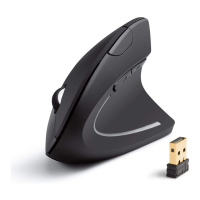

 To Next Page
 General