03 EN EN 04
SETTING UP
THE CAMERA AND MONITOR
3
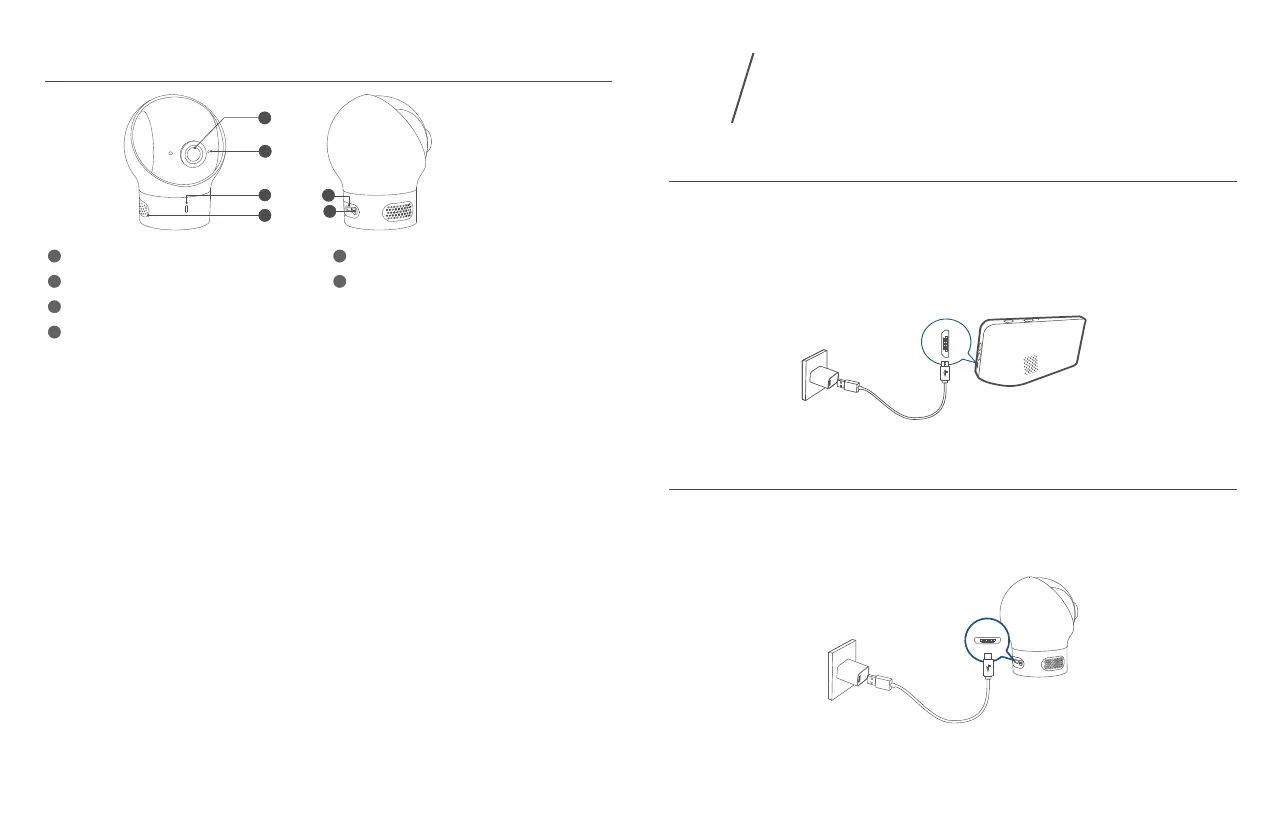
Charge the Monitor
Fully charge the monitor before use. To charge:
1. Connect one end of the micro USB cable to the baby monitor, and the other end to the
power adapter (5V/2A).
2. Plug the adapter into a power outlet.
3. Press and hold the power button for 2 seconds to turn the baby monitor on.
Charge the Camera
1. Connect one end of the micro USB cable to the baby camera, and the other end to the power
adapter (5V 1A).
2. Plug the power adapter into a power outlet.
The new baby monitor and camera will set up automatically. You are all set to use the products
after the monitor and camera are fully charged.
Camera Features
2
1
3
4
5
6
1
Standard camera lens
5
Micro USB port
2
Microphone
6
Pairing button
3
Power Status LED indicator
4
Speaker


 To Next Page