C.Steps for matching on IVT Bluecoleil
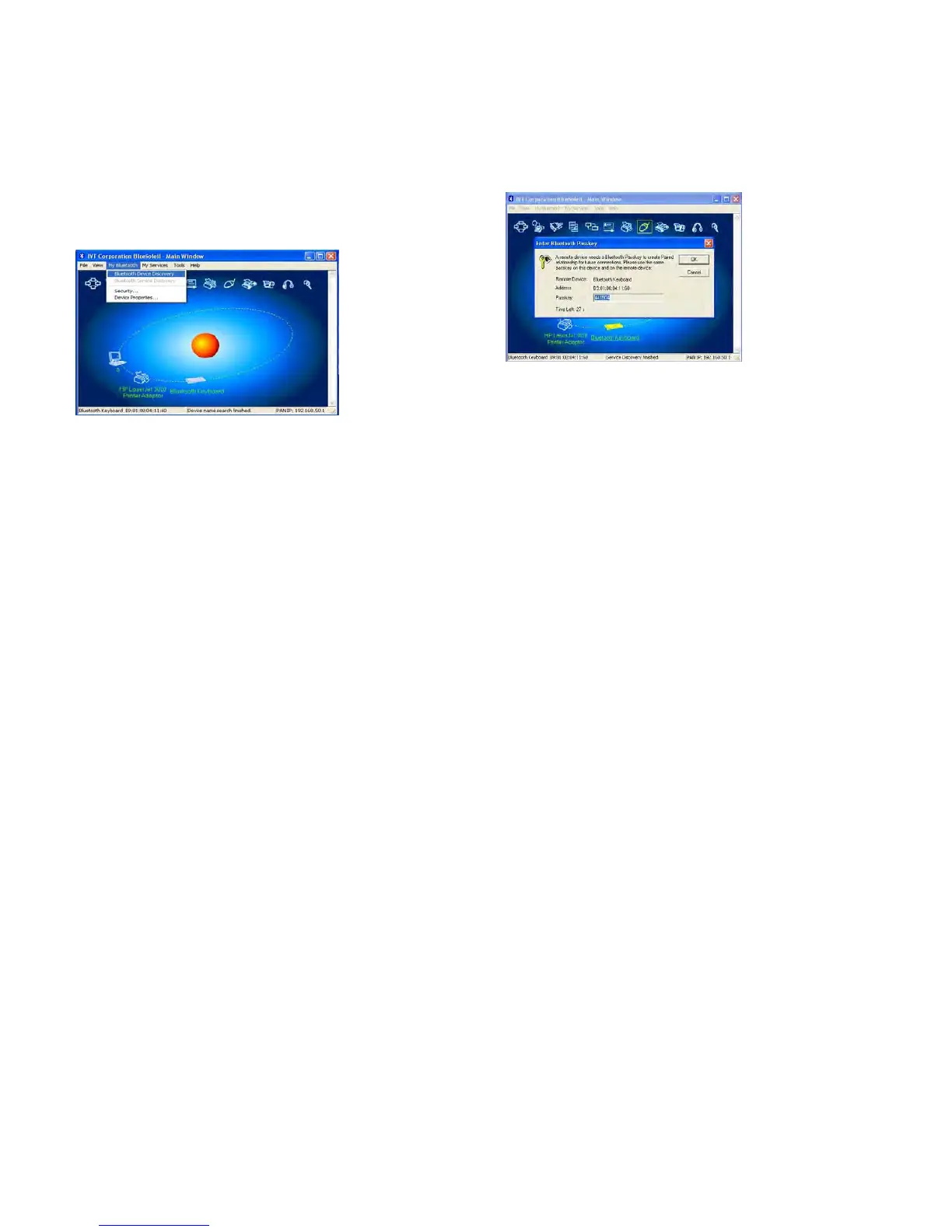
1) .Make sure the bluetooth function have been
activated on the computer system, double click
the bluetooth icon in toolbar, then click
"Bluetooth Device Discovery" under "My
Bluetooth" in toolbar.
2). Select the found bluetooth keyboard device, press
the right button andselect "Refresh Services" .
3). Then select the Bluetooth Keyboard icon, press
right button to select “Connect” and click
“Bluetooth Human Interface Device Service”,On
Bluetooth Keyboard type the stochastic match code
and press the Enter key.
Product Specifications
*
Bluetooth Specification: Version 3.0
*
Range of
Frequency:
2.4GHz Spectrum
*
Operating Voltage: 2.1 ~3.2Vdc ( powered by AAA
batteries )
*
Operation Current: < 5mA
*
Standby Current: 1.2mA
*
Sleep Current: < 0.2 mA
*
Transmit Range: up to 10 meters
*
Storage
Temperature:
-40 ~ +125 degree
*
Dimensions:
300mm(L)x152mm(W)x10.8mm(H)
*
Weight: 260.5g+/-2g
Federal Communication Commission Interference Statement
This device complies with Part 15 of the FCC Rules. Operation is subject to the Following two conditions:
1 This device may not cause harmful interference.
2 This device must accept any interference received., including interference
that may cause undesired operation. Caution: Changes or modifications not expressly approved by the party responsible for compliance could void the user’s authority to operate the
equipment.
Dispose of batteries according to local regulations. Do not dispose as household waste
Troubleshooting
If you are unable to connect your Bluetooth Keyboard to the computer, or the keyboard work unconventionally, please try the following:
* Before you install your Bluetooth Keyboard, please make sure you have done the Bluetooth Dongle installation procedure, and Bluetooth facility is turned on.
* Ensure Bluetooth Keyboard has been paired to PC completely. (The system may require pairing again after restart PC If use low battery to pair )
* Ensure the Bluetooth Keyboard is within a 10 meters range of your PC
* Ensure your bluetooth device of PC have not be changed.(you have to re-connect if changed)
* If your PC bluetooth facility is connected to other bluetooth device, please kindly confirm that the speed of the Bluetooth facility is enough.


 To Previous Page
 Loading...