01 02
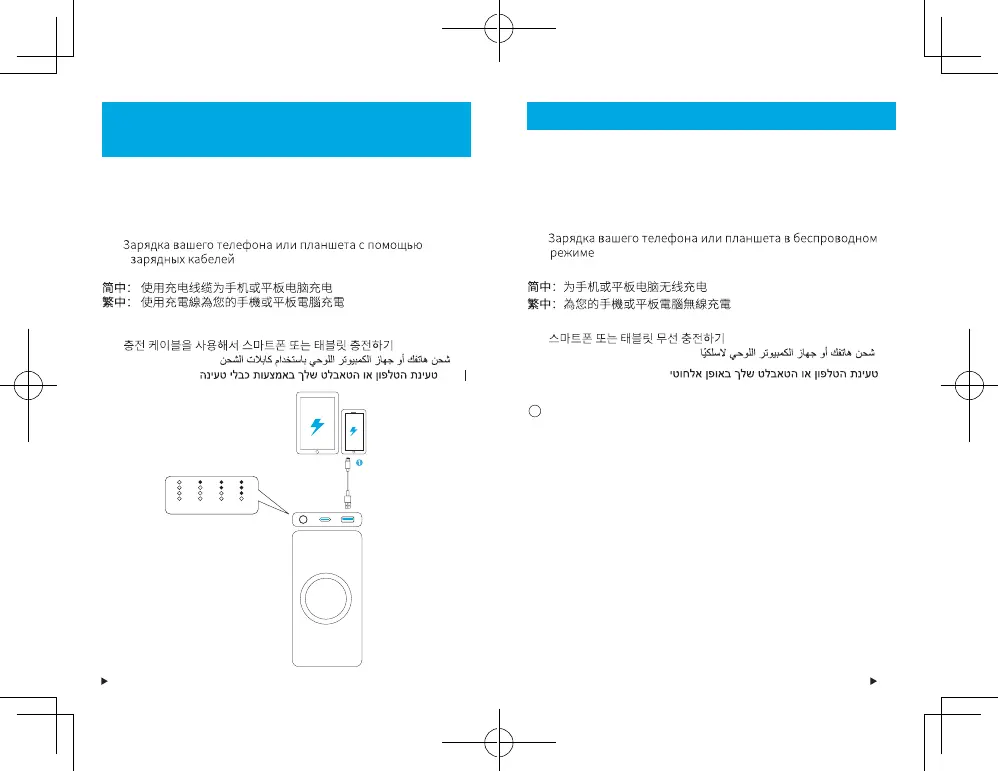
Charging Your Phone or Tablet Using Charging
Cables
DE: Kabelgebundenes Aufladen Ihres Telefons oder Tablets
ES: Carga de un teléfono o una tableta por cable
FR: Chargez votre téléphone ou votre tablette à l'aide d'un câble de chargeur
IT: Ricarica del telefono o del tablet tramite cavi di ricarica
PT: Carregar o seu telemóvel ou tablet com cabos de carregamento
RU:
TR: Telefonunuzu veya Tabletinizi Şarj Kablosu Kullanarak Şarj Etme
JP: ケーブルを使用してスマートフォンまたはタブレット端末を充電
する場合
KO:
:AR
:HE
100% 75% 50% 25%
Charging Your Phone or Tablet Wirelessly
DE: Drahtloses Aufladen Ihres Telefons oder Tablets
ES: Carga de un teléfono o una tableta de forma inalámbrica
FR: Chargez votre téléphone ou votre tablette sans fil
IT: Ricarica del telefono o del tablet in modalità wireless
PT: Carregar o seu telemóvel ou tablet sem fios
RU:
TR: Telefonunuzu veya Tabletinizi Kablosuz Şarj Etme
JP: スマートフォンまたはタブレット端末をワイヤレス充電する場合
KO:
:AR
:HE
To activate the wireless charging function, press the power button. The
wireless charging indicator will breathe blue.
DE: Um die drahtlose Ladefunktion zu aktivieren, drücken Sie die Ein-/
Aus-Taste. Die LED-Anzeige für das drahtlose Aufladen schwillt blau
an und ab.
ES: Para activar la función de carga inalámbrica, pulse el botón de
encendido. El indicador LED de carga inalámbrica se iluminará en
color azul y se desvanecerá.
FR: Pour activer la fonction de charge sans fil, appuyez sur le bouton
d'alimentation. Le voyant d'indication de charge sans fil clignote alors
lentement en bleu.
IT: Per attivare la funzione di ricarica wireless, premere il tasto di
accensione. Lʼindicatore LED di ricarica wireless si illumina di blu.
PT: Para ativar a função de carregamento sem fios, prima o botão para
ligar/desligar. O indicador LED de carregamento sem fios ficará azul
intermitente.
1



 To Next Page