3
2
• This wireless charger is not compatible with non-Magsafe phone
cases, such as Otterbox Defender cases.
• Do not place any foreign objects between your device and the
wireless charger’s surface, including metal pads on a car mount,
magnetic cards, door keys, coins, NFC cards, or other metal objects,
as they could potentially demagnetize the wireless charger, affect
the charging speed, or cause overheating.
• Wireless chargers make charging more convenient than wired
chargers, but confined by current wireless technology, their charging
speed is slower than that of wired chargers.
• High temperatures will reduce charging speed and restrict power. It
is recommended that you charge your device in environments with
temperatures below 40°C / 104°F.
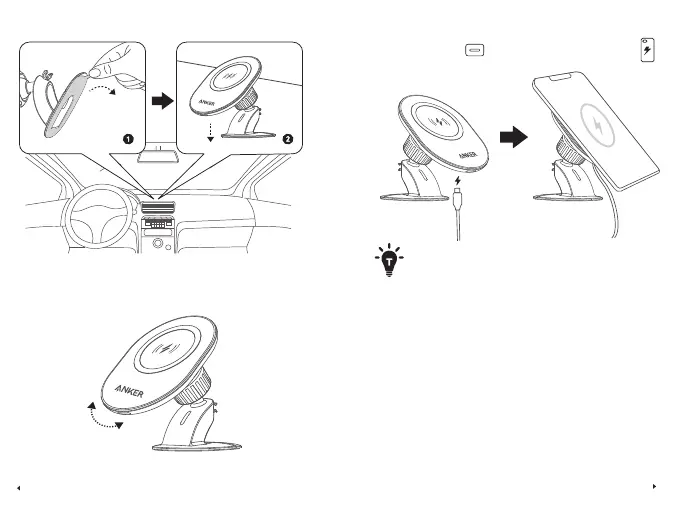
4. Charge Your iPhone
2. Position the Charging Mount on a Center Panel with the Adhesive
3. Adjust the Charging Mount to the Optimal Viewing Angle



 To Next Page