14 English English 15
Using the Google Assistant
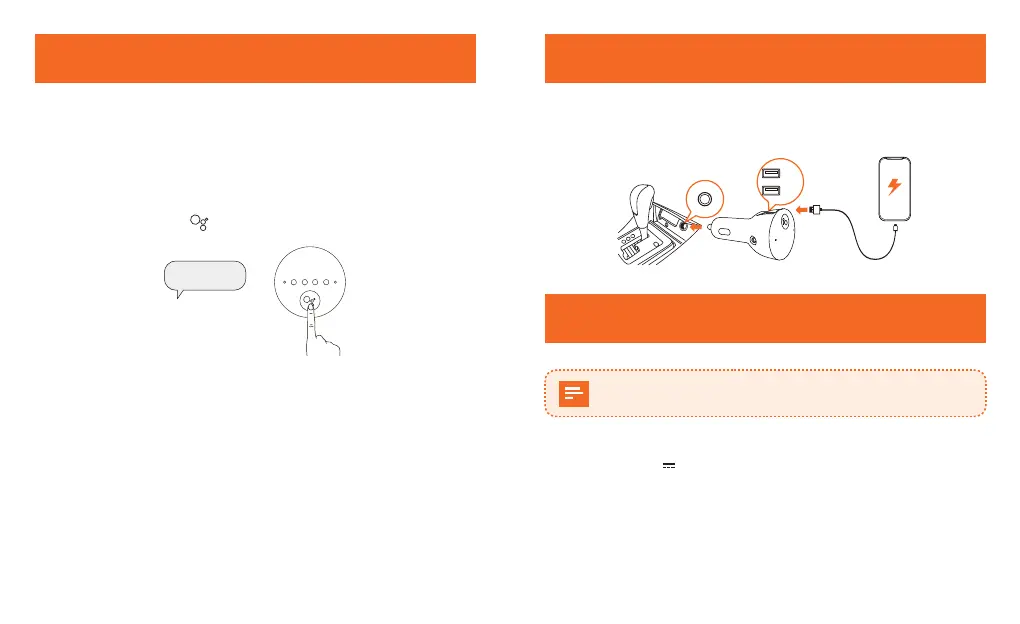
The Google Assistant comes with a voice service feature. You can
play music, get turn-by-turn navigation, call, message, manage
everyday tasks, and easily control smart devices by using your
voice.
To use the Google Assistant services, say “OK Google” or “Hey
Google”, or short press for 0.5 seconds.
or
OK Google......
The Google Assistant Command
- Roav Bolt will respond instantly.
- Visit assistant.google.com/ for more information, or download
the Google Assistant app on your iOS/Android device.
- To enable more functions on your device, please visit the "What it
can do" page on assistant.google.com/ .
Charging Your Devices
Roav Bolt has two USB charging ports. You can charge two devices
at the same time with a maximum output of 5V / 4.8A.
2.4 A
2.4 A
Specifications
Specifications are subject to change without notice.
DC input: 12V - 24V
Power output: 5V 4.8A max
Bluetooth: V4.2
Bluetooth transmission distance: 33ft / 10m
AUX out: 3.5 mm audio output
Operating temperature range: -4°F to 104°F / -20°C to 40°C
Storage temperature range: -40°F to 185°F / -40°C to 85°C


 To Next Page