EN
09
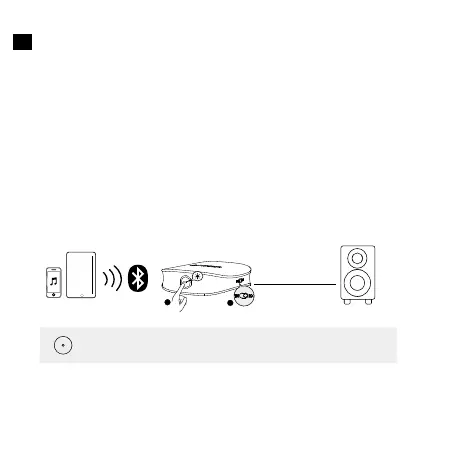
Connect to two smartphones/tablets at a time
• This function is only available in RX mode.
• Soundsync can only receive audio source from one smartphone/tablet
at a time.
1. Connect the first smartphone/tablet to your Soundsync, turn o
Bluetooth on your first smartphone/tablet once connected.
2. Press the multi-function button twice to enter Bluetooth pairing mode.
Pair the second smartphone or tablet with your Soundsync.
3. When the second smartphone/tablet is successfully connected to
Soundsync, turn on the Bluetooth on your first smartphone/tablet again,
and find "Anker Soundsync" on the Bluetooth list to connect.
AUX / SPDIF IN
RX Mode
1
2
x 2
Press Play/Pause (Only available in RX mode)


 To Next Page