EasyManua.ls Logo

anko 42724469 - User Manual

anko 42724469
2 pages
Print Icon
To Next Page IconTo Next Page
Loading...
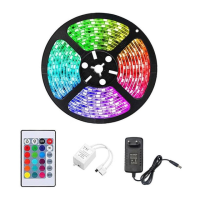
RGB LED STRIP
IMPORTANT SAFETY INSTRUCTIONS:
The following safety precautions should always be followed, it is important to read all of these
instructions carefully before using the product, and to save them for future reference or new users.
This product must only be used as intended in accordance with the enclosed operation
instructions.
CAUTION: Install batteries to correct polarity. Installation by adult recommended.
Do not dispose of batteries in fire.
This product has not been designed for use by children.
Children should be closely supervised always when they are near any electrical appliance.
This product has been designed for indoor use only.
Keep the product and the cables away from water or other liquids. If the product does fall in
water, immediately disconnect the power supply. Do not attempt to pull the product out of the
water when it is connected to a device that is connected to the mains supply!
Never touch the product or the cables with wet hands.
Pull the product out of the device or the mains plug of the connected device out of the socket,
when you are not using the product.
Do not make any modifications to the product. Do not to replace the connector cables by
yourself.
Instruction
1. Clean the surface you intend to stick the light strip to.
2. Peel off the backing strip off the adhesive tape.
3. Press and hold the light strip firmly against the surface.
4. Remove the tab from the battery compartment of the remote control.
5. Connect the USB cable to the USB port or USB wall charger with DC5V 2A output
6. Turn on the LED backlight by pushing the ON button on the remote control.
7. Select the desired colour or the desired effect and push the corresponding button on the
remote control.
8. Please note that the colour settings are mixed colours. For this reason, the colour tints may
exhibit minor deviations. Even white light is a mixed colour and thus not a purely white
colour tint!
9. Set the desired colour brightness using the buttons to increase/decrease the intensity of colour.
10. Push the OFF button to turn off the LED backlight
Question and Answer IconNeed help?

Do you have a question about the anko 42724469 and is the answer not in the manual?

Summary

Important Safety Instructions

Product Operation Instructions

Remote Control

Remote Control Functions

Overview of remote control buttons and their functions, including On/Off, colour selection, and brightness.

Changing the Remote-Control Battery

Production Specification

Summary

Important Safety Instructions

Product Operation Instructions

Remote Control

Remote Control Functions

Overview of remote control buttons and their functions, including On/Off, colour selection, and brightness.

Changing the Remote-Control Battery

Production Specification

Overview

This document describes the Anko RGB LED Strip, a lighting product designed for indoor use.

Function Description

The Anko RGB LED Strip is a versatile lighting solution that allows users to illuminate surfaces with a variety of colors and effects. It is controlled via a remote, offering functions such as on/off, white light, flash, strobe, fade, and smooth transitions. Users can select from 12 mixed colors and adjust the brightness or speed of effects. The strip is designed to be self-adhesive, allowing for easy installation on clean surfaces.

Important Safety Instructions

Before using the product, it is crucial to read and follow all safety instructions. The RGB LED Strip must be used only as intended and in accordance with the provided operation instructions.

Battery Safety:

  • Batteries must be installed with correct polarity.
  • Battery installation is recommended to be done by an adult.
  • Never dispose of batteries in fire.
  • The remote control uses a CR2025 3V button cell battery.
  • WARNING: Button cell batteries can cause serious injury or death if swallowed. Dispose of them safely and store them out of reach of children. For more information, visit TheBatteryControlled.com.au.

General Safety:

  • This product is not designed for use by children. Children should always be closely supervised when near any electrical appliance.
  • The product is designed for indoor use only.
  • Keep the product and its cables away from water or other liquids.
  • If the product falls into water, immediately disconnect the power supply. Do not attempt to retrieve it from water while connected to a power source.
  • Never touch the product or cables with wet hands.
  • Always pull the product out of the device or disconnect the mains plug of the connected device from the socket when not in use.
  • Do not make any modifications to the product.
  • Do not attempt to replace the connector cables yourself.

Important Technical Specifications

  • Product Type: RGB LED Strip Light
  • Input: DC 5V 2A max via USB port
  • Keycode: 42724469, 42724476
  • Remote Control Battery: CR2025 3V button cell battery

Usage Features

The Anko RGB LED Strip is straightforward to install and operate.

Installation:

  1. Clean the surface where the light strip will be applied.
  2. Peel off the backing strip from the adhesive tape.
  3. Press and hold the light strip firmly against the surface to ensure proper adhesion.
  4. Remove the tab from the remote control's battery compartment to activate the battery.
  5. Connect the USB cable to a USB port or a USB wall charger with a DC5V 2A output.

Remote Control Functions: The remote control provides comprehensive control over the LED strip:

  1. On/Off Switch: Turns the LED backlight on or off.
  2. White Light: Activates a mixed white color.
  3. Flash: Provides a flashing function.
  4. Strobe: Offers a slow fading out of a single color.
  5. Fade: Enables slow fading out with color changes.
  6. Smooth: Provides smooth color transitions.
  7. Control Panel for Color Selection: Allows selection from 12 mixed colors.
  8. Red, Green, Blue Color Buttons: Direct selection of primary colors.
  9. Brightness/Rate Adjustment: Increases or decreases the brightness of colors, or adjusts the speed (fast/slow) of flash, strobe, fade, and smooth modes.

Color Notes:

  • The color settings are mixed colors, meaning color tints may show minor deviations.
  • Even "white" light is a mixed color and therefore not a purely white tint.

Maintenance Features

Changing the Remote-Control Battery: The remote control comes with the battery pre-inserted, but a transport guard needs to be removed before first use.

  1. Remove the transport guard.
  2. Unscrew the screw on the battery door.
  3. Locate the battery compartment on the narrow side of the remote control and pull it out as shown in the diagram.
  4. Remove the empty battery and insert a new 3V CR2025 battery, ensuring the positive terminal points upwards.
  5. Slide the battery compartment back into the remote control until it locks in place.

No other user-serviceable parts or maintenance procedures are described for the LED strip itself, emphasizing the instruction not to make any modifications or replace connector cables independently.

anko 42724469 Specifications

General IconGeneral
Brandanko
Model42724469
CategoryHome Lighting Accessories
LanguageEnglish