This document describes the Anko Bluetooth® Selfie Stick Tripod with Remote, Keycode: 42750505. It serves as an instruction manual for its use and maintenance.
Function Description
The Anko Bluetooth Selfie Stick Tripod is a versatile device designed to assist in taking selfies and group photos. It functions as both a selfie stick and a tripod, offering flexibility for various photography needs. The device includes a detachable Bluetooth remote control, allowing users to trigger the camera shutter wirelessly. It is compatible with smartphones and connects via Bluetooth.
Parts and Components
The device comprises several key parts:
- Phone holder: This component securely holds the smartphone. It features a width/length adjustment screw to accommodate different phone sizes.
- Telescopic rod: This extendable rod allows the device to function as a selfie stick, providing increased reach for wider shots.
- Mount with hinge screw: This part connects the phone holder to the telescopic rod and allows for angle adjustments.
- Mini tripod: The base of the device can unfold into a mini tripod, providing a stable platform for hands-free photography.
- Remote control: This small, detachable unit is the core of the wireless functionality. It fits into a remote control compartment when not in use.
Remote Control Features
The remote control has the following features:
- Blue LED: Indicates the status of the remote control, such as pairing mode or battery status.
- - button: Used in conjunction with the + button for zooming or other functions depending on the smartphone.
- + button: Used in conjunction with the - button for zooming or other functions depending on the smartphone.
- ON/OFF switch: Powers the remote control on or off.
- Shutter button: Triggers the smartphone camera shutter wirelessly.
- Mini USB port: Used for charging the remote control. A USB charging cable (not pictured in detail but mentioned as included) is used for this purpose.
Important Safety Instructions
Before using the device, it is crucial to read and follow all safety instructions to avoid damage or improper use:
- Always keep the instruction manual for future reference.
- The device should be given to a third party with the instruction manual.
- Keep the device away from all hot surfaces and naked flames.
- Do not immerse the device in water or other liquids.
- Do not use the device in wet conditions.
- Do not use the tripod in windy conditions or on an uneven surface.
- Do not use the device if it is damaged.
- Only use the included charging cable to charge the remote control.
- This device is not a toy. Children should be supervised to ensure they do not play with the device.
Before First Use
- Unpack the device and check if all parts are there and undamaged. If not, return the product to Kmart for replacement.
- Danger of suffocation! Keep all packaging materials away from children.
- Remove all protective foils and packaging material prior to use.
Charging the Remote Control
The remote control is powered by an integrated rechargeable battery. If the battery is removed or replaced, the remote control must be turned off to recharge.
- Connect the charging cable (included with delivery) with the Micro plug to the USB port on the remote and the USB plug to a suitable USB port on your computer.
- The blue LED lights up and switches off when fully charged.
Bluetooth Connection
To use the Bluetooth functionality:
- If you have used Bluetooth connection before, the system will start searching for the device last connected. If found, it will re-connect automatically.
- If you want to switch between devices, you have to turn off Bluetooth on the device last connected.
- NOTE: Only one Bluetooth device can be connected to the remote control at one time.
First Bluetooth Connection
- Push the ON/OFF switch of the remote control to position ON. The blue LED starts blinking.
- Turn on Bluetooth on your smartphone. Refer to its user manual for instructions on pairing and connecting Bluetooth devices.
- Select "KM42750505" from the device list.
- The blue LED turn off when the device is connected.
- If you lose connection, press any remote control button to reconnect.
Usage Features
- Turn on your smartphone, make sure the Bluetooth connection is established, and open your camera app.
- Mount the phone holder on the selfie stick.
- Adjust the width/length and place your smart phone in the phone holder. Carefully tighten the screw to provide a secure grip for your smartphone.
- Loosen the hinge screw and set the tilt of the phone holder. Tighten the hinge screw again.
- Extend the telescopic rod to the desired length.
- Hold the stick or unfold the tripod to place it on a flat surface.
- Press the shutter button to take a picture.
- After use, slide the ON/OFF switch to OFF.
- Please note: The selfie stick automatically switches to sleep mode and can be reactivated by pressing any remote control button.
With some Android phones the +/- button can be used for zooming. This function must be supported by your phone.
Care and Maintenance Features
- After use, push the ON/OFF switch to OFF.
- Wipe all parts with a dry soft cloth.
Important Technical Specifications
- Power supply: Rechargeable battery
- Input: DC5V 100mA
- Length: Collapsed: 20.5cm, extended: 58.5cm
- Maximum load: 220g

 Need help?
 General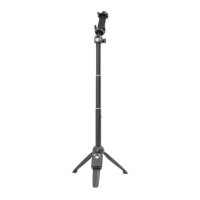

 To Next Page