Pairing the headphone with
Bluetooth devices
• Once the headphone is powered on, you
will hear a voice prompt "Power on", the
headphone will then pair to the last
paired device.
• If not previously paired, search on your
electronic device's Bluetooth menu and
select the pairing name KM42901952 or
KM42901969.
• Once connected you will hear a voice
prompt "The device is connected
successfully".
• To shut down the Bluetooth function on
the current connected device, the
headphone will go to pairing mode again
with red and blue light flashing and is
available to be connected with a
different device.
Phone calls
• Press power button to pick up /hang up
phone calls.
• Press and hold power button for 2
seconds to reject calls.
• Press power button twice to call the
previous number called.
Voice Activating
• Press the power button 3 times to
activate your phone assistant to play
music, make phone calls or respond to
message, etc.
Playing music
• When the headphone connects with the
electronic device via Bluetooth you can
enjoy music through the headphone
wirelessly.
Battery Charging
• Please use the provided USB cable to
charge the battery.
• Insert the micro USB cable end into the
headphone charging port
• Insert USB charging cable into an
appropriate 5V 1A USB port.
• The light will turn red when charging and
turn blue when the headphone is fully
charged.
• It takes about 3.5 hours to fully charge
the battery.
Model No:
42901969, 42901952
Version:
V5.0
Support profiles:
A2DP1.3/HFP1.6/HSP1.2/AVRCP1.6
Working Distance:
10 Meters
Music Time:
≈20 Hours
Talk time:
≈13 Hours
Standby time:
~6 Months
Charging voltage:
5V d.c.
Battery capacity:
450mAh
Charge time:
3.5 Hours
Cable length:
1m
Pairing window time:
5 Minutes
Play / Pause / Phone
Function overview:
Function Operation
Pause Press button
Play Press button
Next Song Press and hold the + button
Previous Song Press and hold the - button
Answer Call Press button
End Call Press button
Decline an Incoming Call Hold down
for about 2 seconds
Redial Last Call Press twice
Activate Siri or Voice Assistant Press
3 times
Volume Up Press the + button once
Volume Down Press the - button once
Power ON / OFF
Power ON
Press and hold the power button until blue
LED flashes
Power OFF
Press and hold the power button until red
LED flashes
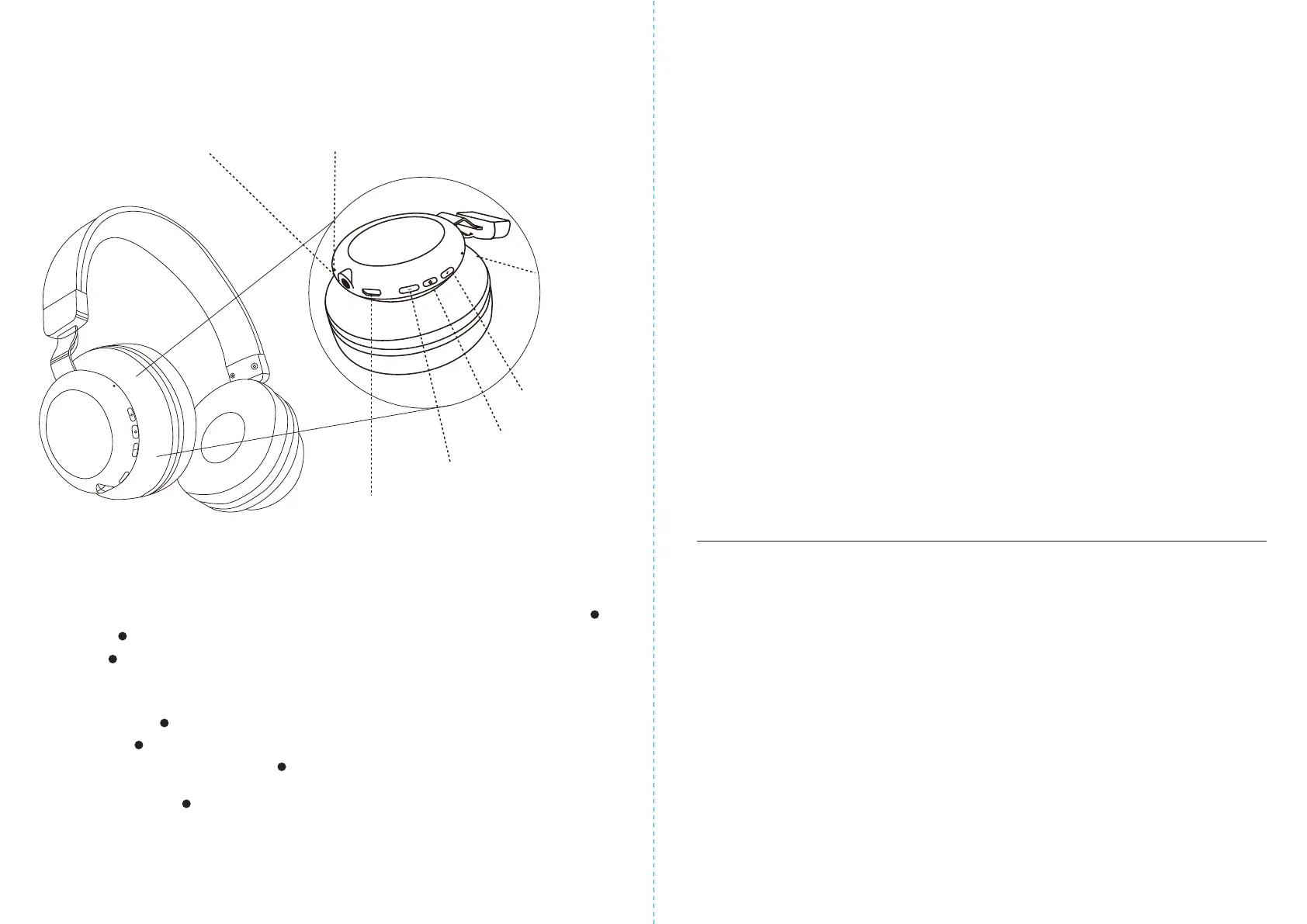
How to use these headphones:
Next song /
Volume up
Previous song / Volume down
USB charging port
3.5mm Headphone jack Built-in microphone
LED indicator
Specifications:
The Bluetooth
®
word mark and logos are registered trademarks owned by Bluetooth
®
SIG, Inc.,
and any use of such marks by KMART AUSTRALIA is under licence.
Power ON/OFF


 To Previous Page
 Loading...