9
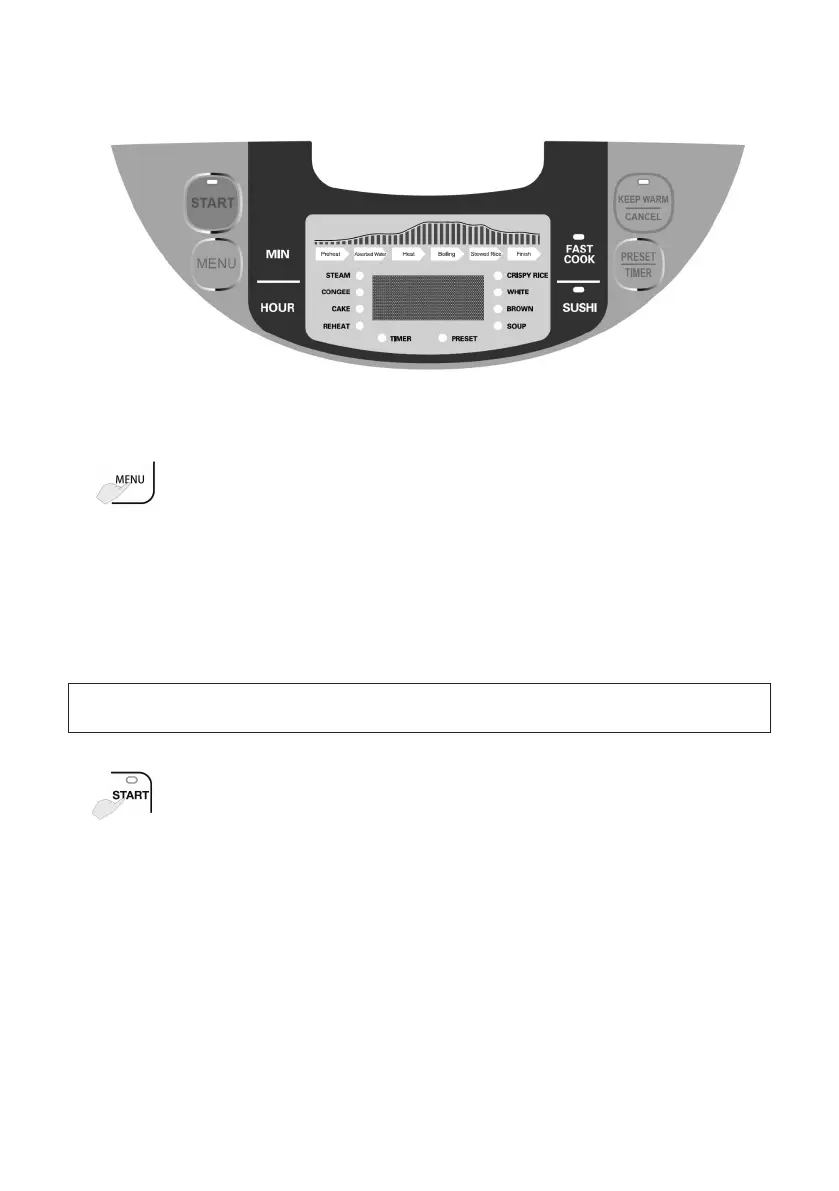
INSTRUCTION ABOUT CONTROL PANEL
Control panel
OPERATION INSTRUCTION
1.
Press MENU repeatedly to select the desired menu/cooking
mode. The corresponding indicator light flashes.
Selectable menus:
Crispy Rice, White, Brown, Soup, Steam, Congee, Cake and
Reheat.
NOTE: SUSHI and FAST COOK menus can only be selected by pressing
corresponding buttons directly.
2.
After a menu is selected, press START to start cooking.
After cooking is finished, the corresponding indicator light goes
out, the appliance emits several “beeps” and automatically
enters the KEEP WARM mode. The KEEP WARM indicator
lights up and KEEP WARM time is shown on the LCD display.


 To Next Page