
 Need help?
Do you have a question about the Ankway ASC001 and is the answer not in the manual?
Camera requires 2.4g Wi-Fi; use Wi-Fi extender for weak signals.
Optimal PIR range is 18ft diameter; recommended height is 9ft; avoid obstacles.
Options for cloud storage or micro SD card, including insertion and formatting guidelines.
Ensure phone, router, and camera are within 1.5 feet during initial pairing.
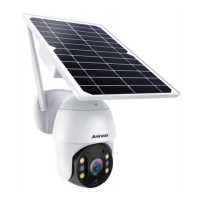
Identifies key parts like Solar Panel, MIC, Lens, LEDs, PIR sensor on the camera.
Lists items included in the box: Solar Panel, Batteries, Screw kit, Camera, USB cable, Position Paper.
Check signal, use Wi-Fi extender if needed, and recommended 9ft mounting height.
Adjust angle, lower PIR sensitivity, or avoid nearby vegetation for fewer false alarms.
Guides through integrated and separated mounting using position paper, drilling, and bracket fixing.
Troubleshooting steps for failed QR code connection, including Wi-Fi, screen brightness, and router settings.
Tips for successful sound wave connection, focusing on distance, room, and phone volume.
Addresses no live streams (check Wi-Fi) and no motion alerts (check push mode, PIR setting).
Explains the need for cloud service or SD card and selecting the correct storage type in app.
Explains the meaning of different LED blink patterns for battery and camera status.
 General
| Brand | Ankway |
|---|---|
| Model | ASC001 |
| Category | Security Camera |
| Language | English |

 To Next Page