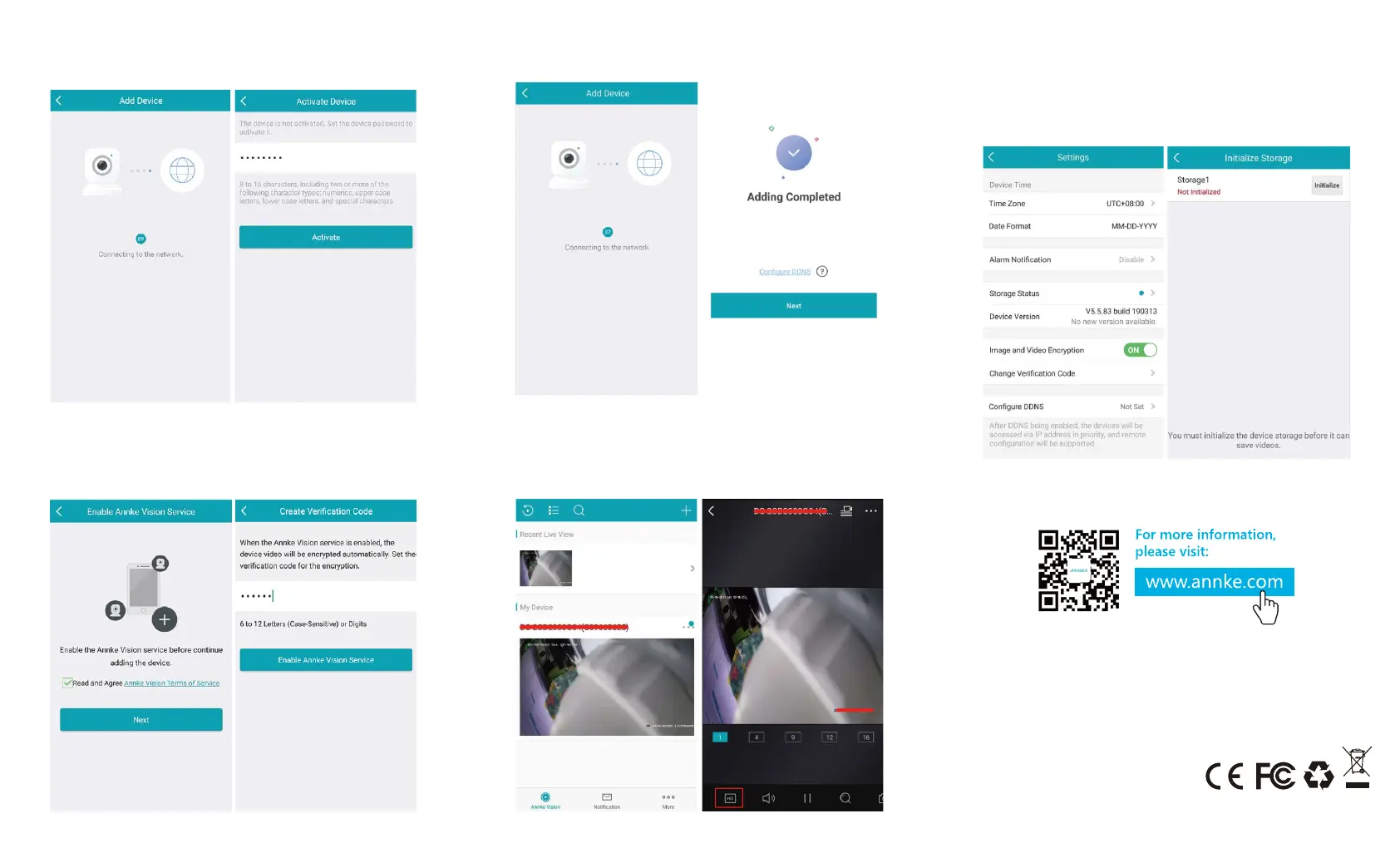
3. Then it will connect to the network. Please set a device password
to activate it, and keep it well.
5.Then the device will added to your account soon.
6. After the device is added, it will appear in the device list. You can
click to access the live preview. You can also adjust the preview
image resolution to HD, take snapshots, record to your phone, etc.
7. You can click the “...” button in the top right corner to access the
camera's settings interface, modify the device name, change the
time zone, etc. If the IP camera supports TF card, there will be
storage status prompt the first time you insert the card. You need
to click “
Initialized” to format the new TF card before recording.
Manufacturer: Shenzhen Kean Digital co., Ltd.
Address: 10th Floor, Rujun Building, NO. 105, The
Center Road, Bantian Street, Longgang
District, Shenzhen, 518129,China
For technical help please visit help.annke.com
Tech support: support@annke.com
Made in China
4. Now please enable Annke Vision service. Tick “Read and Agree
Annke Vision Terms of Service”, click “next”, then set a
verifica tion code for your camera and keep it well. After that,
please click “Enable Annke Vision Service”.


 To Previous Page