Contact Customer Support at 0800 080 6781 (Toll Free); +44 207 157 9795
ANSIO 1502 (Feb’23v01) support@ansio.co.uk 7
STEPS TO CHANGE THE VOLTAGE SETTING
NOTE: These steps assume that Voltage Selector is set to 220-240V default.
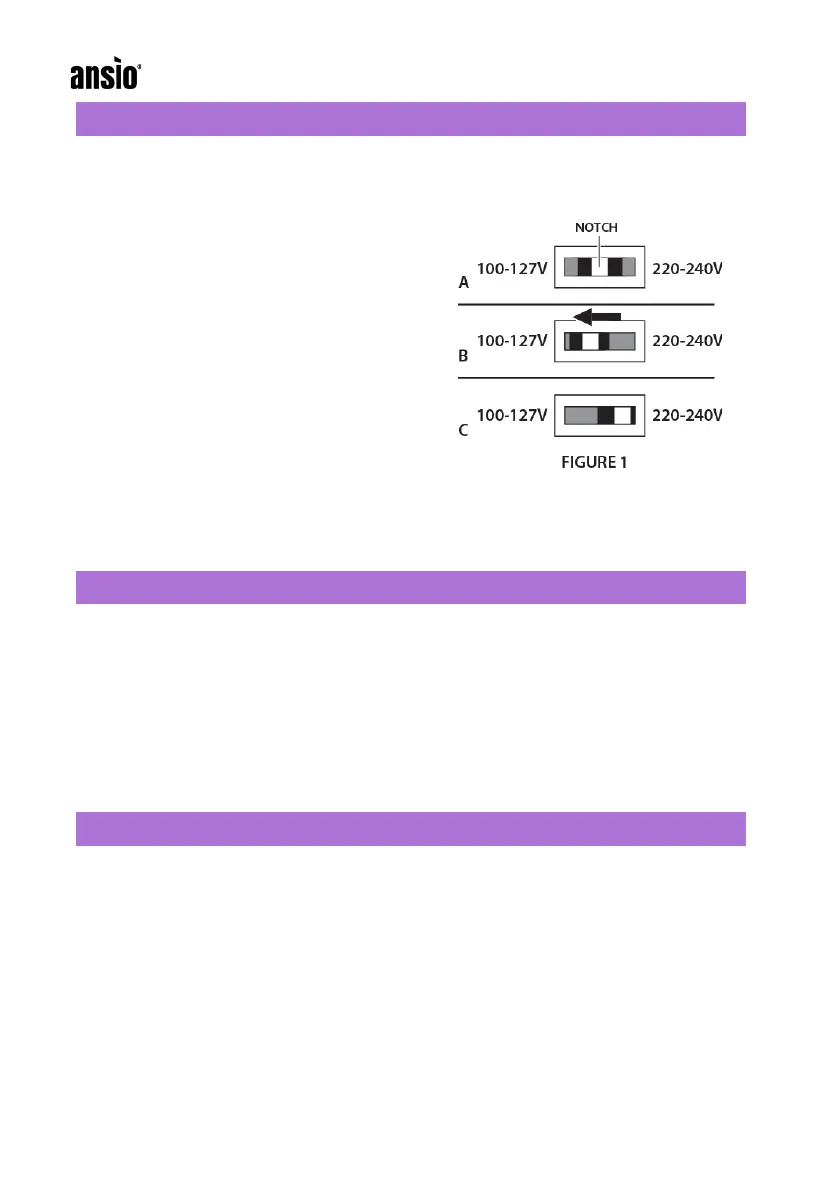
1. Locate the Voltage Selector, recessed inside slot at the back of the Steam iron.
Locate the white open notch in middle of
Voltage Selector (FIGURE 1-A)
2. Use a tool with a fine tip.
3. Carefully insert the tip of the tool into the
white notch. Slide Voltage Selector to
the left, towards 100-127V label
(FIGURE 1-B). The iron is now ready for
use in a 120V region.
4. To set unit back to 220V, slide the
Voltage Selector as far to the right
(towards 220-240V label) as possible.
IMPORTANT:
Be sure that Voltage Selector is moved as far to the right as possible for voltage
setting to take effect correctly. Voltage Selector should appear as shown (FIGURE
1-C)
FABRIC IRONING RECOMMENDATIONS
• For heat-sensitive fabric, cover it with a piece of cotton fabric on top to avoid
damage
• Iron clothes with lower heat resistance first.
• Use an ironing board to avoid any damage to clothing or the iron
• If the iron is too hot, it might leave yellow traces on your clothing. If it
happens, humidify the stains with oxidized water, rinse and dry.
• Black or dark clothing should be ironed from the inside out to avoid leaving
a trace.
MAINTENANCE
• Always unplug when not in use
• Ensure that all water is removed after use
• When the iron cools down completely, wipe the main body and the ceramic
sole plate with a soft cloth slightly moistened with water.
• Do NOT clean the ceramic sole plate with detergents or de-scalers, abrasive
or corrosive products.
• Do NOT submerge the iron or hold under running water.
• Wait for the iron to be completely cool before it is stored away.
• Install the water tank cap to product main body.



 To Next Page