53
24 HOURS mode
– Red LED constant.
Interval ventilation
– Red and green LED go on alternately
one second each.
SLEEP mode
– Green LED goes on for two seconds.
Dehumidication mode
– Red LED goes on for two seconds.
ADJUSTING THE SPEED FOR QUIET
MODE
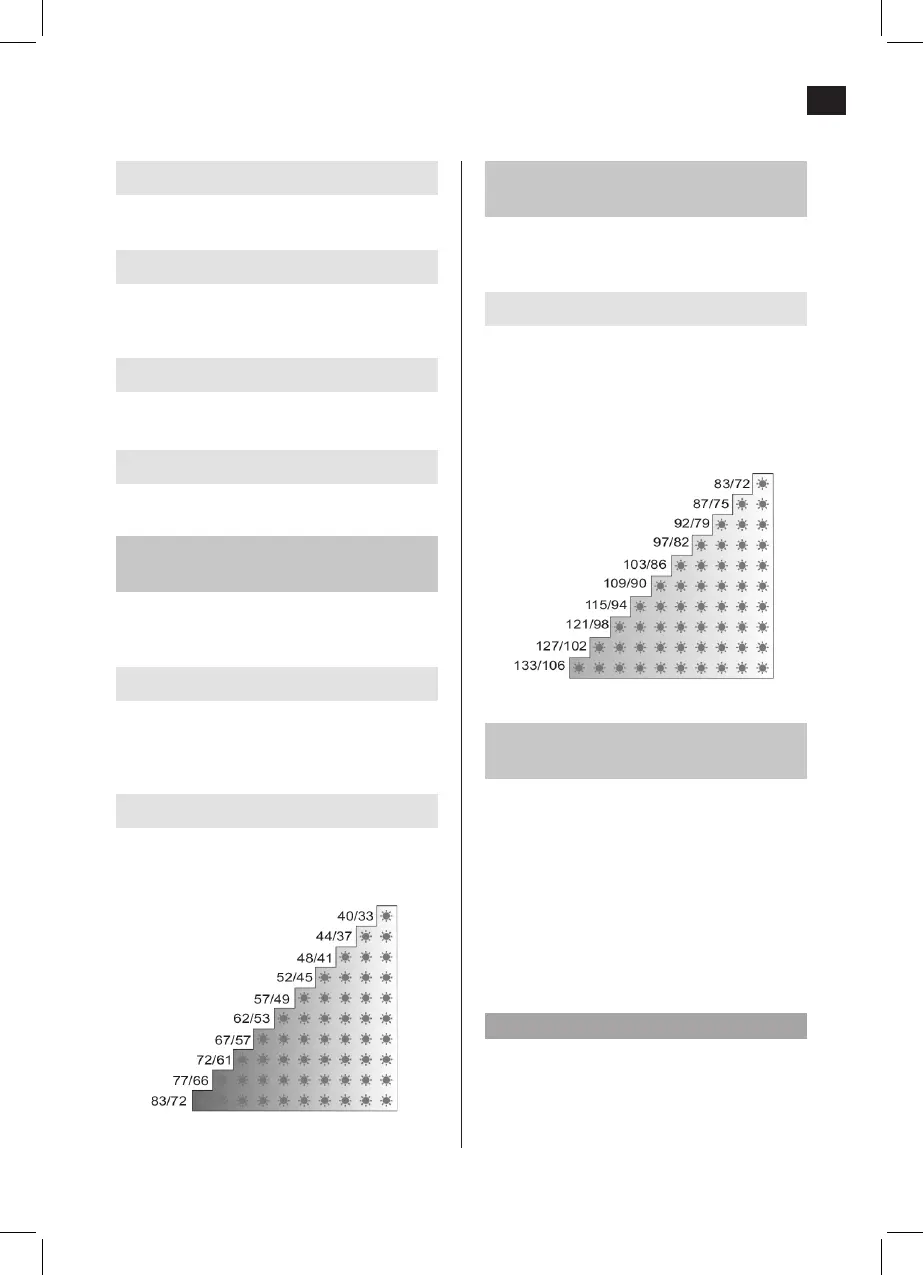
The standard air ow setting is: 83/72 m
3
/h
(Ø125/Ø100).
On the control panel
Press + to increase or – to reduce the fan
speed. To show the actual speed, press the +
or – button once.
On the remote control
Under SILENT, press + to increase, or – to
reduce the fan speed. To show the actual
speed, press the + or – button once.
Air ow (m³/h)
ADJUSTING THE SPEED FOR
MAXIMAL MODE
The standard setting is air ow 97/82, m
3
/h (Ø
125/Ø 100).
On the control panel
Press in the MODE button and press + to
increase, or – to reduce the fan speed. On
the remote control: Under MAX, press + to
increase, or – to reduce the fan speed.
To show the actual speed, press in the MODE
button and press the + or – once.
ACTIVATION AV DEHUMIDIFICATION
MODE
If the humidity increases, the fan speed
increases to remove damp air. When the
humidity has stabilised the timer starts the
countdown and the fan runs for the set time.
The fan then returns to the previous mode.
Activate the dehumidication mode by
pressing the HUMIDITY MODE button on the
control panel or the SILENT and MAX buttons
on the remote control. Press the HUMIDITY
MODE button once to show the current setting.
NOTE:
The humidity is considered to have stabilised
when it has not changed by more than 3% for
5 minutes.
Air ow (m³/h)


 To Next Page