‐
7
‐
Z9 mini Server Installation Guide
2. Connecting the Power Supply
2. Connecting the Power Supply
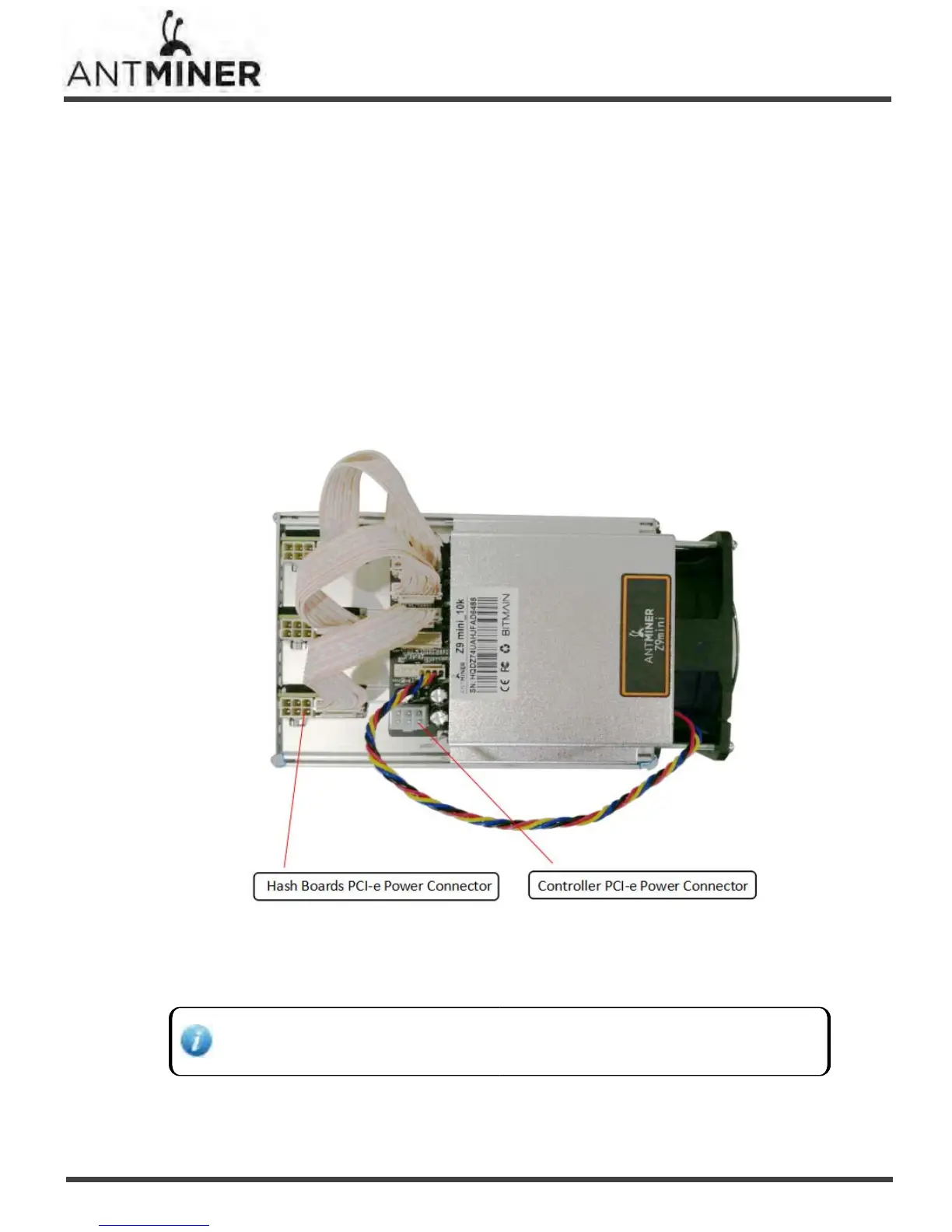
Four PCI‐e connectors are located at the top of the Z9 mini server for connecting the PSU as follows:
● Three PCI‐e connectors for the hash boards. Each hash board has one PCI‐e connector.
●
One PCI‐e connector located on the controller.
To connect the power supply:
1. Connect PSU power cable connectors to each of the three PCI‐e connectors on the top of the Z9 mini
server.
2. Connect a PSU power cable connector to the Z9 mini PCI‐e connector on the controller.
3. Connect the network cable to the ETH port.
4. To power up your Z9 mini server, connect the PSUs to the power wall outlet.
If you are using more than one PSU,power up the PSU connected to the controller AFTER you have
Powered up the other PSU(s).


 To Next Page