Remote control
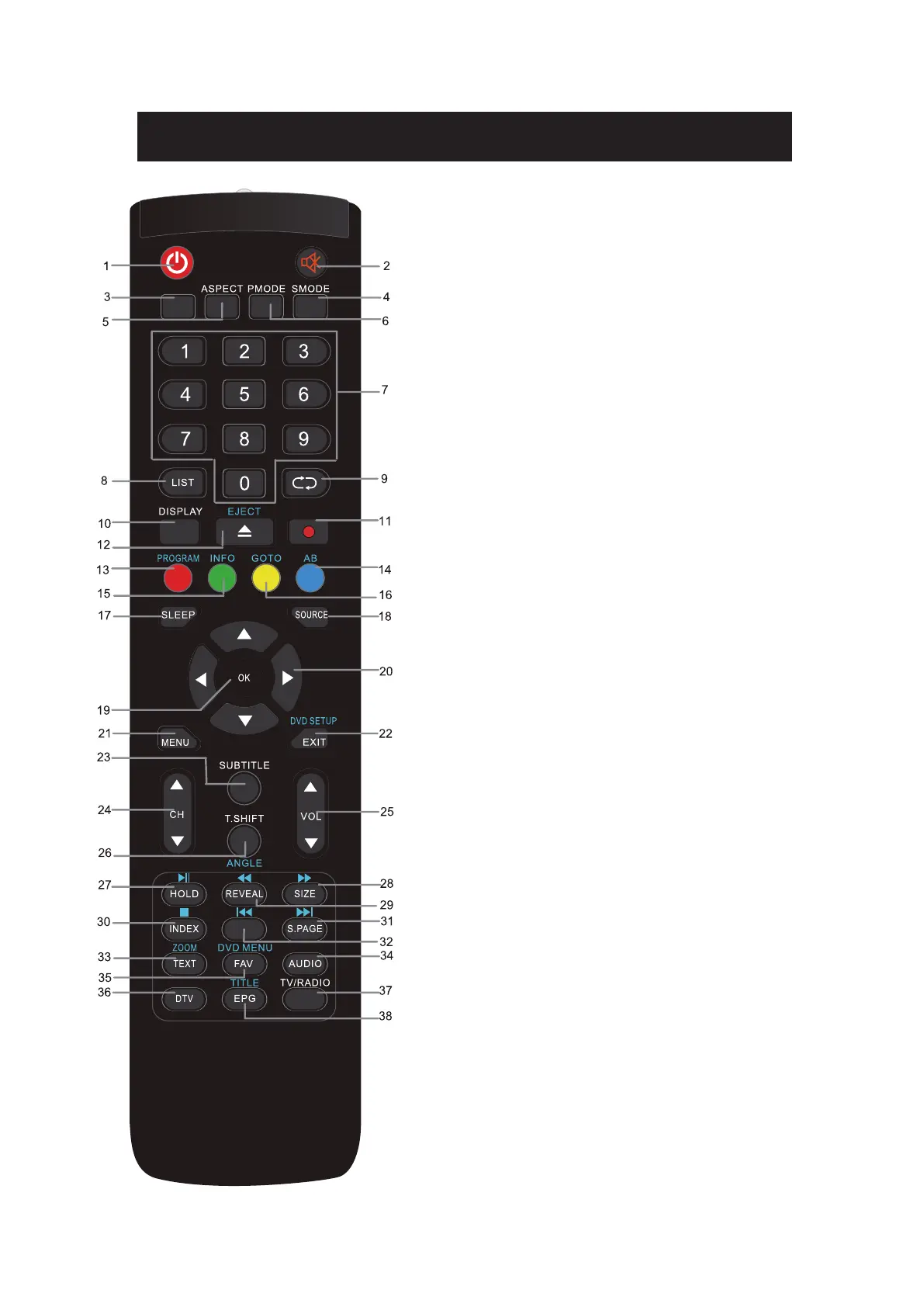
1. POWER: to switch the set device to on or standby.
2. MUTE: To disable or enable the sound output.
3. MEDIA: Open Media Playback (USB)
4. SMODE: To change the sound setting
5. ASPECT: to switch the apsect ration
6. PMODE: Change image setting
7. NUMBER KEYS: used to select channel numbers or
input numbers in menus.
8. LIST: Shows the channel list
9. RECALL: To show the last viewed channel
10. Display: Used to display information about the channel
being viewed or further information about the program
when in DTV mode.
11. REC: Start recording
12. EJECT: Eject DVD in DVD mode
13. RED Colour key:
In menu: Menu function as displayed
In TV mode: Teletext functions
In DVD mode: Playback programming
14. BLUE Colour key
In Menu: Menu function as displayed
In TV mode: Teletext functions
In DVD mode: A-B repeat
15. GREEN Colour key
In Menu: Menu function as displayed
In TV mode: Teletext functions
In DVD mode: DVD Informations
16. YELLOW Colour key
In Menu: Menu function as displayed
In TV mode: Teletext functions
In DVD mode: Goto DVD position
17. SLEEP: Set timer to turn off the TV.
18. SOURCE: Select input source
19. OK: Used to confirm a selection within a menu.
20. ARROW KEYS: Move within the menus.
21. MENU: open the menu of the current title.
22. EXIT:
In menu: Used to return to the previous screen or menu.
In DVD mode: Open DVD settings
MEDIA


 To Next Page
 Loading...