
 Need help?
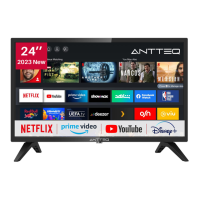
Do you have a question about the ANTTEQ AV24H3 and is the answer not in the manual?
Warns about high voltage and not opening the product casing.
Advises against removing the cover and requires qualified personnel for servicing.
Details the meaning of warning symbols like lightning and exclamation marks.
Covers instructions for safe use, installation, and handling of the TV and its accessories.
Provides information and trademarks related to High-Definition Multimedia Interface technology.
Details risks associated with dropping, pushing objects, leaning, or standing on the TV.
Advises on avoiding rain, moisture, heat sources, and ensuring proper ventilation.
Emphasizes safe placement on stable surfaces and careful handling of the power cord.
Warns about the glass LED panel potentially breaking upon impact.
Explains the functions of power, input, navigation, OK, and exit buttons.
Details buttons for channel selection, program guides, and main TV menus.
Describes buttons for media playback, sound control, and launching specific applications.
Identifies and describes various ports like HDMI, USB, AV, RF, and CI slot.
Guidance on reaching the main interface after initial setup.
Explains the purpose of icons for inputs, settings, notifications, and user accounts.
Instructions on how to switch between different connected devices and tuners.
Lists the main categories available in the settings menu.
Guides on choosing presets like Standard, Cinema, Dynamic, and Sports.
Explains how to stretch or zoom the picture.
Details on enabling Game Mode for optimal gaming experience.
Instructions to access detailed picture adjustments.
Covers adjusting Backlight, Brightness, Contrast, Saturation, and Sharpness.
Explains options for reducing picture noise and MPEG artifacts.
Guides on modifying the overall color tone of the image.
Instructions to enter advanced color and gamma calibration menus.
Adjusting hue, saturation, and brightness of color settings.
Modifying red, green, and blue light intensity for color accuracy.
Adjusting HDMI signal range for better content suitability.
Selecting and calibrating gamma curves for optimal picture.
Enabling specific color channels for advanced tuning.
Restoring picture settings to factory defaults.
Choosing sound presets for different content types like music or speech.
Configuring audio output for connected headphones.
Applying sound modes to all or current sources.
Adjusting bass, surround sound, dialog clarity, and volume.
Selecting digital audio output formats and speaker configuration.
Configuring wired or wireless network connections for smart features.
Enabling wake-up functions over network connections.
Performing an automatic search for available TV channels.
Options for rescanning channels and setting reception type (Antenna/Cable).
Configuring scan mode, search mode, and LCN settings.
Visualizing the progress and status of the automatic channel scan.
Managing existing channels and accessing advanced tuning options.
Performing manual scans for DTV and ATV channels.
Automating updates for channel lists and program guides.
Adjusting menu scheme, contrast, and transparency for better visibility.
Enabling features like subtitles, audio descriptions, and voiceovers.
Setting time format, date, time zone, and daylight saving.
Setting a timer to automatically turn the TV off.
Scheduling the TV to turn on automatically.
Configuring power off timers, menu timeouts, and auto sleep.
Setting a PIN for system access and restricting content.
Selecting display language and geographical location.
Managing installed apps, cache, and cookies.
Enabling content sharing and Hybrid Broadcast Broadband TV features.
Managing HDMI device interactions and power synchronization.
Configuring privacy settings and accessing specific applications like Prime Video.
Customizing TV name, screensaver, and input labels.
Adjusting fast power on and power on mode.
Performing self-diagnosis and accessing the e-manual.
Updating TV firmware and reviewing disclaimers.
Restoring the TV to its original factory default settings.
Navigating to view the list of tuned channels.
Accessing the Electronic Program Guide (EPG).
Managing subtitle display and audio language preferences.
Entering the media center to play files.
Adjusting video playback like zoom, rotation, and repeat modes.
Viewing media file information and playlists.
Configuring image display options such as zoom and repeat.
Setting display intervals and managing picture lists.

 To Next Page
 General