
 Need help?
Do you have a question about the Anysecu G6000 and is the answer not in the manual?
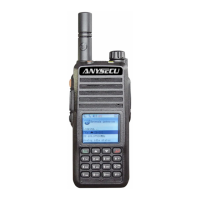
Lists core functionalities and specifications of the walkie-talkie, highlighting its capabilities.
Provides essential safety warnings and guidelines for operating the walkie-talkie in various environments.
Details the accessories provided with the device, including a visual guide for identification.
Step-by-step instructions for charging the walkie-talkie's battery, including indicator light status.
Guides on safely installing and removing the battery pack, with important usage warnings.
Instructions for attaching the antenna and belt clip for optimal use and portability.
Procedures for connecting external speakers/microphones and attaching the device harness.
Clarifies the meaning of various icons displayed on the dual mode interface for user understanding.
Details the interface for distance measurement using GPS, showing coordinates and altitude.
Explains key functions for operating in public network intercom mode.
Describes key functions for using the analog intercom mode.
Details key operations specific to the public network intercom mode.
Explains button functions for operating in analog talkback mode.
Describes button functions for using the walkie-talkie's phone capabilities.
Guides on using the group monitoring function within the public network interface.
Explains group member display and selective call features.
Covers friend display and selection call functions in the public network interface.
Explains how to display and set analog channel names.
Details button functions for operating in transfer mode.
Describes button functions for sending and receiving text messages.
Explains navigation and settings within the main function menu.
Details how to activate the SOS alarm and the information transmitted.
Describes the interface when an SOS alert is received, including location data.
Lists technical specifications related to the device's network capabilities.
Details the technical specifications for the UHF radio frequency bands.
Outlines the warranty period, terms, and conditions for the product and its accessories.
 General
| Brand | Anysecu |
|---|---|
| Model | G6000 |
| Category | Two-Way Radio |
| Language | English |

 To Next Page