This document serves as the user manual for the ANYSUN Sewer Inspection Camera with Distance Counter, a professional-grade push camera designed for inspecting sewers, drains, and pipes. The system provides a comprehensive solution for identifying and locating problems within various piping systems.
Function Description:
The ANYSUN Sewer Inspection Camera is primarily used for visual inspection of inaccessible areas within pipes and drains. Its core function is to provide a clear picture of internal pipe conditions, allowing operators to identify issues such as blockages, leakages, tree roots, and structural damage. The system includes a camera probe, a 7-inch LCD monitor with a distance counter, and a DVR for recording inspections. It supports both manual and auto capture modes for photos and videos. The camera head is waterproof (IP68) and features built-in LED lights for illumination in dark environments. The integrated distance counter helps pinpoint the exact location of identified problems within the pipe. The DVR function allows for one-touch recording and saving of video footage and still images to an 8GB SD card. The monitor offers various display adjustments, including brightness, contrast, color, tint, and image rotation (90, 180, 270, 360 degrees), as well as zoom in/out capabilities for detailed viewing. The system is also capable of video output to an external monitor.
Important Technical Specifications:
- General:
- Operating Temperature: -10°C to 50°C
- Operating Humidity: -20°C to 70°C
- Storage Temperature: PARAMETER (not specified, but likely similar to operating range)
- Power Adapter Input: 110V AC~240V AC
- Power Adapter Output: 12.6V 4500mA
- Camera:
- Sensor: 1/3" Sony CCD
- TV-Line: 1000 TV-Line
- View Angle: 92°
- Self-Leveling: Built-in
- Camera Size: 23mm Ø (0.9inch)
- Camera Length: 128mm
- Front Lens Material: Sapphire
- Shell Material: 304#Stainless Steel
- Lighting: Built-in 12xLEDs (White)
- Waterproof Rating: IP68
- Power Supply: DC 12V
- Current Consumption: 60mA (LED OFF), 140mA (LED ON)
- DVR:
- Screen: 7-inch, 800x480 RGB
- Mirror and Flip: Supports image mirror, flip
- Video Format: AVI
- Picture Format: JPEG
- LED Driver: Built-in Dimmer
- Playback: Video, Photo, and Audio
- Language: English and so on
- Power Supply: DC 12V Input
- Battery Capacity: 12.6V 4500mAh Li-ion Battery
- Life Time: 6-9 Hours
- Charge Time: 8 Hours
- Cable Wheel:
- Cable Diameter: 0.19inch
- Cable Length: 30meter / 100FT
- Meter Counter: Built-in
- Battery: 12V 4500mAh 6PCS 18650 Lithium Battery.
Usage Features:
- Distance Counter: The system features a built-in distance counter displayed on the 7-inch LCD screen, allowing operators to accurately track the camera's insertion depth in meters or feet.
- DVR Functionality: The control box includes a DVR with an 8GB SD card for recording videos and taking still pictures. Recording is initiated with a single button press, and files are automatically saved.
- Screen Rotation: The monitor allows for 360-degree image rotation (90, 180, 270, 360 degrees) using the "MIRROR" button, providing flexibility in viewing orientation.
- Zoom Function: Users can zoom in and out of pictures using the "ZOOM-" and "ZOOM+" buttons for detailed inspection.
- Adjustable Lighting: The camera's LED lights have adjustable brightness, controlled via the "LED BRIGHT" switch on the control box, to suit different lighting conditions within the pipe.
- Remote Control: A remote control is provided for convenient operation of monitor functions such as power, AV mode, menu navigation, image adjustments (brightness, contrast, color), image rotation, and screen sleep time settings.
- Centering Skid: A universal centering skid can be installed on the camera to fix and protect it, ensuring smooth navigation through pipes and preventing damage.
- Charging Options: The device can be charged directly by plugging the charging head into the 12V lithium battery, or by setting the control box switch to "ON/AUX" and inserting the charging head into the "DC 12V" hole.
- Video Output: An AV cable (not included) can be connected to the "VIDEO OUT" interface on the control box to synchronize the display with an external monitor.
- Menu Navigation: The DVR's settings, including capture modes (manual/auto), photo/movie sizes, file overwrite, TV output, SD card formatting, and time stamps, can be accessed and adjusted through the MENU button.
Maintenance Features:
- Regular Cleaning: To prevent issues like blue screen, the manual advises gently unscrewing the camera head and using a clean, non-dust, dry cloth to clear any dust, ash, or dirt from the components.
- Dry Storage: It is recommended to keep the product dry after use to prevent damage.
- Camera Protection: After use, the camera should be removed and covered with a protective cover to prevent metal oxidation.
- Cable Handling: The cable is made of hard material and should not be bent less than 90 degrees during operation, as this can easily break the coil.
- Troubleshooting: The manual provides troubleshooting steps for common issues like the camera light not turning on or a blue screen display, including checking connections, cleaning components, and using a testing cable.
- Warranty: The product comes with a one-year warranty covering manufacturing defects and shipping damage to accessories like the camera probe or monitor. Damage due to improper operation is not covered.

 Need help?
 General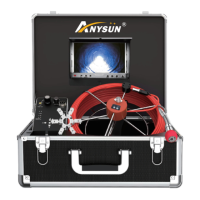

 To Next Page