EasyManua.ls Logo

ANYSUN SY3800 - User Manual

ANYSUN SY3800
17 pages
Print Icon
To Next Page IconTo Next Page
Loading...
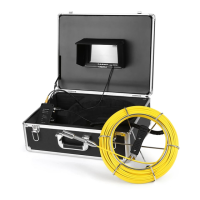
AnysunSY3800Sewer Inspection Camera
User Manual
Pleasereadthisusermanualcarefullybeforeusingthisproduct
Question and Answer IconNeed help?

Do you have a question about the ANYSUN SY3800 and is the answer not in the manual?

Summary

Safety Precautions

Technical Specifications

Battery Control Box Identification

Powering On The Camera System

Monitor Controls and Functions

Video Recording and Playback

Instructions for recording video and playing back recorded content using the REC and PLAY buttons.

Menu Navigation and Settings Adjustment

Guide to entering the menu, selecting options like brightness, contrast, and rotation.

Image Capture and File Management

How to take pictures, view them, delete files, and format the memory card.

On-Screen Navigation and Selection

Using '<' and '>' buttons for moving and selecting items within the menu or playback.

Memory Card Installation and Removal

Recording Video Footage

Viewing Recorded Video Files

Capturing Still Images

Viewing Captured Images

Camera Unit Overview

Pushrod Cable Handling

Cable Extension Procedure

Instructions on how to properly extend and secure the flexible pushrod cable.

Cable Wrapping Procedure

Guide on how to neatly wind and store the pushrod cable onto the reel.

Screen Image Rotation

Battery Charging Procedure

Package Contents List

Product Warranty Information

Customer Support and Contact

ANYSUN SY3800 Specifications

General IconGeneral
BrandANYSUN
ModelSY3800
CategoryAnalytical Instruments
LanguageEnglish