mode, please stop recording and take photos.
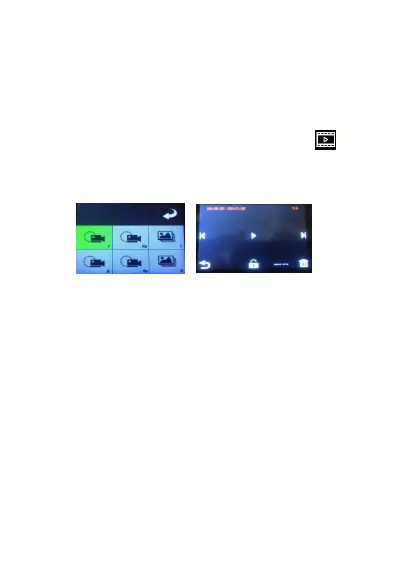
Playback recording You can browse pictures or play
back videos in playback mode. In playback mode, there
are the following main functions:
1. Press the bottom left corner of the home page The
icon enters the playback interface, as shown in the
Choose the "F" folder as the normal preview video.
Select the "Fa" folder to lock the prerecorded video.
Choose the "R" folder as the normal post-video, and the
"Ra" folder as the locked post-video.
2. After clicking into the folder, enter the interface as
follows: can play the selected files, fast forward, fast
backward, the previous song, the next song, delete, etc.
3. Another click during playback will be paused, and
clicking on the return icon will return to the previous


 To Next Page