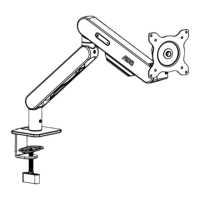
The AOC AM420 Ergonomic Monitor Arm is a versatile mounting solution designed to enhance workspace ergonomics and flexibility. This device allows users to position their monitors optimally, reducing strain and improving productivity. The manual provides comprehensive instructions for installation, adjustment, and safety, catering to a global audience with support for multiple languages including English, German, French, Italian, Spanish, Portuguese, Russian, Turkish, and Korean.
Function Description:
The AOC AM420 is an ergonomic monitor arm system that facilitates the mounting and positioning of one or more monitors on a desktop. Its primary function is to provide adjustable support for displays, allowing users to customize height, tilt, swivel, and rotation. This flexibility is crucial for creating an ergonomic workstation, as it enables users to align their monitors at eye level and at an appropriate distance, thereby mitigating neck, back, and eye strain. The arm is designed for both clamp and grommet mounting methods, offering adaptability to various desk configurations. Cable management features are integrated to keep the workspace tidy and free from clutter, routing monitor power and data cables along the arm structure. The arm incorporates a spring tension adjustment mechanism, which is essential for accommodating different monitor weights and ensuring stable positioning.
Important Technical Specifications:
The AOC AM420 monitor arm is engineered to support a range of monitor sizes and weights.
- Fits Screen Sizes: 17-34 inches. This broad compatibility ensures that a wide variety of common monitors can be used with the arm.
- Max Load Weight: 2-9 kg. This weight range is critical for ensuring the stability and safety of the mounted monitor. Users must ensure their monitor's weight falls within this specification to prevent equipment damage or personal injury.
- Full Arm Extension: 495/455 mm. This indicates the maximum reach of the arm, allowing for flexible positioning of the monitor further away from or closer to the user.
- Tilt Range: -15° to +90°. This extensive tilt capability allows users to adjust the vertical angle of the monitor, reducing glare and optimizing viewing comfort.
- Swivel Range: ±90°. The swivel function enables horizontal rotation of the monitor, useful for sharing content with others or adjusting the viewing angle without moving the entire desk.
- Screen Rotation: 360°. This feature allows the monitor to be rotated from landscape to portrait orientation and vice versa, which is particularly beneficial for tasks like coding, document review, or graphic design.
- Grommet Spacing (for grommet mount): 15-80 mm. This specification defines the acceptable range for the diameter of the desk's grommet hole when using this mounting method.
- Maximum Table Thickness (for grommet mount): 15-80 mm. This indicates the range of desk thicknesses compatible with the grommet mounting option.
- Maximum Table Thickness (for clamp mount): 15-80 mm. Similar to grommet mount, this specifies the compatible desk thickness for the clamp mounting method.
- Product External Dimensions: The arm has a length of 455 mm, a width of 325 mm, and a height of 115 mm when packaged. The arm's extended dimensions are 495 mm (full arm extension) and 245 mm (height from desk to monitor mount).
- Net Weight: 5.0 kg.
- Gross Weight: 5.8 kg.
- Packaging Dimensions: 405(L)X325(W)X115(H) mm.
- VESA Compatibility: 75x75 mm and 100x100 mm. This ensures compatibility with standard monitor mounting patterns.
Usage Features:
The AOC AM420 is designed for user-friendly operation and maximum adjustability.
- Dual Mounting Options: Supports both clamp and grommet mounting, providing flexibility to adapt to different desk types and user preferences. The clamp mount is ideal for desks without existing holes, while the grommet mount offers a more integrated and stable solution if a desk hole is available.
- Easy Installation: The manual outlines a clear, step-by-step installation process, starting with attaching the monitor bracket to the monitor, followed by mounting the lower arm to the desk bracket, and then installing the upper arm.
- Spring Tension Adjustment: A crucial feature that allows users to fine-tune the arm's tension to match the weight of their monitor. This ensures that the monitor stays in the desired position without drifting up or down. Adjustments are made using a provided tool (tool "b") to tighten or loosen screws, with a warning to adjust the arm to a 90° position before making tension changes.
- Rotation Adjustment: Users can adjust the ease of monitor rotation (swivel) by tightening or loosening specific screws on the arm. This prevents the monitor from rotating too freely or being too stiff to adjust.
- Pitch (Tilt) Adjustment: The monitor's forward and backward tilt can be adjusted to achieve the optimal viewing angle, reducing glare and improving comfort. Similar to rotation, this is controlled by tightening or loosening screws with the provided tool.
- Cable Management: Integrated clips and channels along the upper and lower arms help route monitor cables, keeping them organized and out of sight. Users are advised to ensure sufficient cable slack at arm joints to allow for full range of motion without snagging or damaging cables. The arm can accommodate up to two 6mm diameter cables or three 3mm diameter cables.
Maintenance Features:
While the manual does not explicitly detail routine maintenance, several aspects imply the design's consideration for longevity and safety:
- Durable Construction: The robust design and specified load capacity suggest a durable construction intended for long-term use.
- Adjustable Components: The ability to adjust spring tension, rotation, and tilt means that the arm can be re-calibrated over time to maintain optimal performance, even if components experience minor wear.
- Safety Warnings: The manual includes critical safety warnings, such as not exceeding the maximum load, ensuring the mounting surface can support the combined weight, keeping small parts away from children, and not disassembling the powerful spring. Adhering to these warnings is key to preventing damage and ensuring user safety, which is a form of preventative maintenance.
- Proper Installation and Adjustment: The emphasis on correct installation and adjustment procedures is a fundamental aspect of maintenance, as it prevents premature wear and potential damage that could arise from improper setup. For example, tightening mounting clamps and screws properly ensures stability and prevents components from loosening over time.
In summary, the AOC AM420 Ergonomic Monitor Arm is a well-designed, adjustable, and safe solution for optimizing monitor placement in a modern workspace, offering extensive flexibility and ease of use across various monitor and desk configurations.

 Need help?
 General

 To Next Page