EasyManua.ls Logo

AOC AS110D0 - User Manual

AOC AS110D0
2 pages
Print Icon
To Next Page IconTo Next Page
Loading...
E
10~90mm
10~90mm
10~90mm
D
H
H
D
H
G
E
Hop on (G) into the
bottom twister (E)
according to the
thickness of table.
Monitor Size: 13~32"
Weight Capacity:2-9kg
VESA Size:75x75mm,100x100mm
Model:AS110D0
C
AOC Ergonomic Monitor Arm
Installation Manual
A:Clamp-Mounting
B:Hole-Mounting
C:Cable-Management
D:VESA Mount installation
E:Monitor angles adjustment
Packaging List
M4x12MM
M5x12MM
Clamp-Mounting Procedures:
B :Hole-Mounting Procedure
A
Step
Step
Step
Step
Please tighten the
3 black screws (D)
onto the base
Warning
2
Warning:
Please make sure to
tighten the screws
Warning:
Please make sure to
tighten the screws
2
Insert screws from (E)
into (H) Plate, tighten
the 3 screws (D) onto
the arm base.
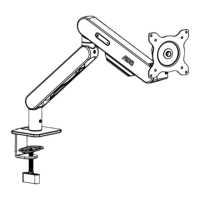
Diagram of full-assembled monitor arm spec in depthDiagram of full-assembled monitor arm spec in depth
Noted:
Please freely adjust the clamp distance based on the
thickness of your desk.
MAX
Clamp-mounting
Hole-mounting
=
+
C
L-Plate
Turner
Warning:
Please make sure to
tighten the screws
Question and Answer IconNeed help?

Do you have a question about the AOC AS110D0 and is the answer not in the manual?

Summary

Packaging List and Components

Clamp-Mounting Procedures

Step 1: Clamp Attachment

Attach clamp components (C, D, H) to the arm base and desk.

Step 2: Desk Thickness Adjustment

Adjust clamp distance and secure based on desk thickness.

Hole-Mounting Procedure

Step 1: Insert Screws

Insert screws (E) into plate (H) and tighten onto arm base.

Step 2: Secure Plate

Hook plate (G) into bottom twister (E) based on table thickness.

Monitor Arm Specifications

Clamp-Mounting Specs

Diagram showing arm movement ranges for clamp mounting.

Hole-Mounting Specs

Diagram showing arm movement ranges for hole mounting.

Cable Management

Step 1: Compartment Management

Pull out upper compartment and unscrew bottom compartment.

Step 2: Tighten Screws

Tighten screws after managing cables.

VESA Mount Installation

Step 1: VESA Plate

Prepare VESA plate for 75x75mm or 100x100mm mounting.

Step 2: Attach Monitor

Manually tighten plate (A/B) onto monitor top holes.

Monitor Angle Adjustments

Monitor Weight Adjustment

Adjust gas-spring power based on monitor weight for stability.

Angle and Rotation Specs

Diagrams showing monitor angle and rotation capabilities.

Company Information

Summary

Packaging List and Components

Clamp-Mounting Procedures

Step 1: Clamp Attachment

Attach clamp components (C, D, H) to the arm base and desk.

Step 2: Desk Thickness Adjustment

Adjust clamp distance and secure based on desk thickness.

Hole-Mounting Procedure

Step 1: Insert Screws

Insert screws (E) into plate (H) and tighten onto arm base.

Step 2: Secure Plate

Hook plate (G) into bottom twister (E) based on table thickness.

Monitor Arm Specifications

Clamp-Mounting Specs

Diagram showing arm movement ranges for clamp mounting.

Hole-Mounting Specs

Diagram showing arm movement ranges for hole mounting.

Cable Management

Step 1: Compartment Management

Pull out upper compartment and unscrew bottom compartment.

Step 2: Tighten Screws

Tighten screws after managing cables.

VESA Mount Installation

Step 1: VESA Plate

Prepare VESA plate for 75x75mm or 100x100mm mounting.

Step 2: Attach Monitor

Manually tighten plate (A/B) onto monitor top holes.

Monitor Angle Adjustments

Monitor Weight Adjustment

Adjust gas-spring power based on monitor weight for stability.

Angle and Rotation Specs

Diagrams showing monitor angle and rotation capabilities.

Company Information

AOC AS110D0 Specifications

General IconGeneral
MaterialAluminium, Metal
Product colorBlack
Adjustment typeGas spring
Display diagonal27 \
Height adjustment320 mm
Weight (with stand)2400 g
Panel mounting interface75 x 75, 100 x 100 mm
Package weight3000 g
Pivot angle0 - 360 °
Swivel angle90 °
Tilt angle range-45 - 60 °
Depth adjustment range0 - 460 mm
Housing materialAluminum
Market positioningGaming
Height (max)580 mm
Mounting typeDesk
Maximum VESA mount100 x 100 mm
Minimum VESA mount75 x 75 mm
Maximum screen size32 \
Minimum screen size13 \
Maximum weight capacity9 kg
Number of displays supported1
Harmonized System (HS) code85299097
Weight and Dimensions IconWeight and Dimensions
Depth120 mm
Width280 mm
Height410 mm