Double-Click
Perform a double-click.
Fire Button
Perform a fire button until release.
Assign a Shortcut
Assign a shortcut combination.
Windows Key
Start Windows menu.
Smart Key
If you assign a button with Smart Key function, while holding down the Smart Key, press the other
button, the Smart Key will repeat this button’s action continuously.
Button Off
Switch off the button.
Sensitivity
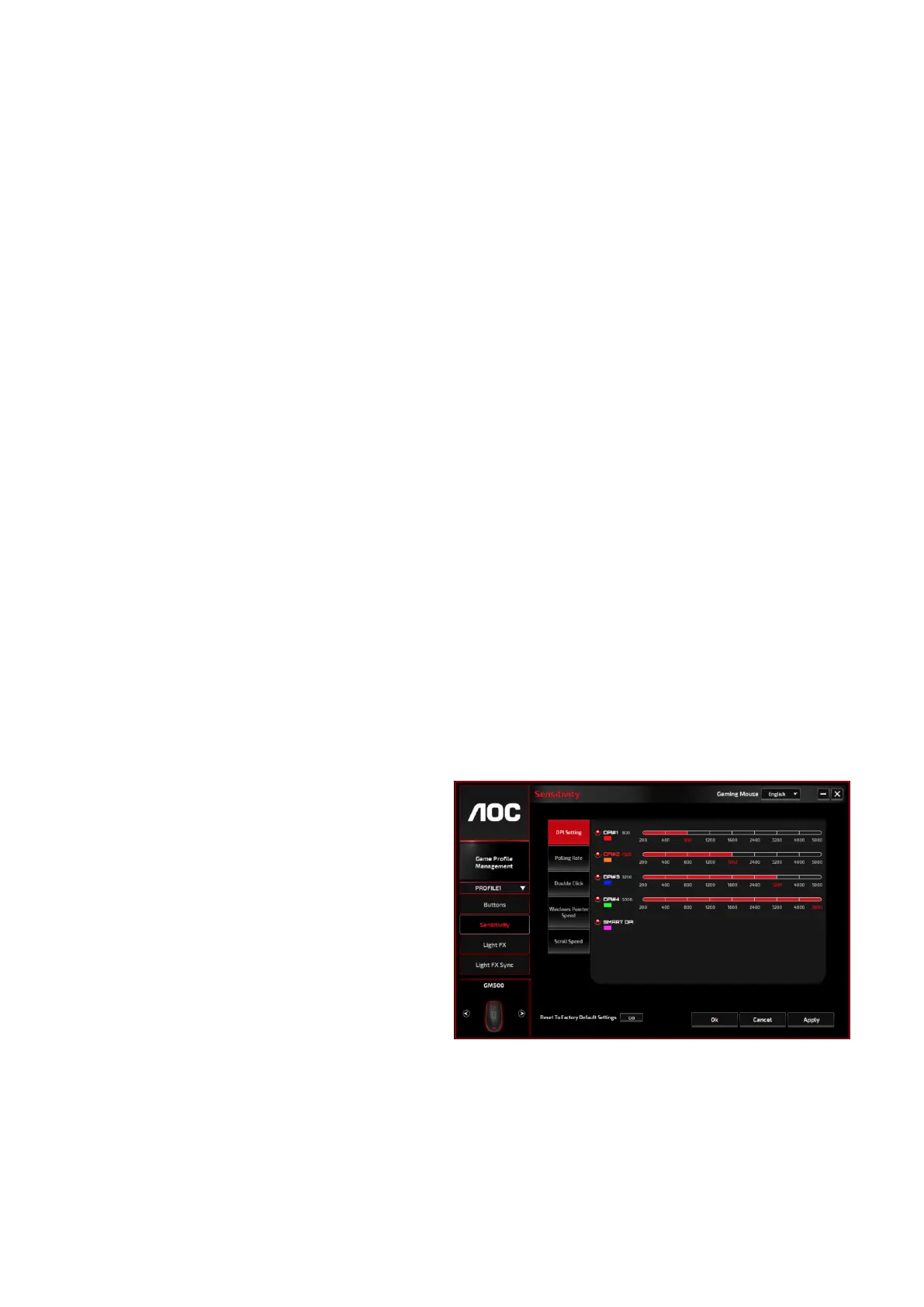
DPI Setting
You can define 4 sets of the DPI values ranged from 200 to 5000 to suit your needs. The set DPI
values will be applied to the DPI cycle function. When a set value is currently in use, it will be
highlighted in red, and the corresponding LED color will be shown on your device.
The default values are as below:
.DPI #1: 800 DPI / Red LED
.DPI #2: 1600 DPI / Orange LED (Default)
.DPI #3: 3200 DPI / Blue LED
.DPI #4: 5000 DPI / Green LED
.DPI #5: SMART DPI / Purple LED
When switching DPI, the scroll light of GM500 displays the corresponding color for 5 seconds
and then resumes the lighting effect in use.


 To Next Page