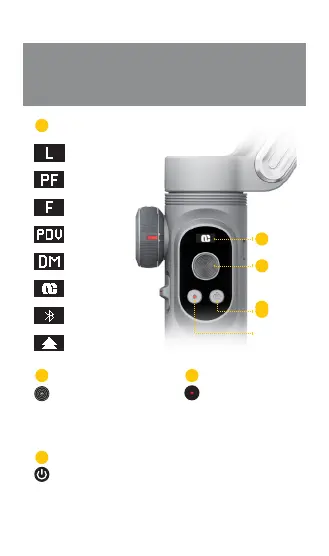
Joystick: move up and down, left and
right
Single click: switch to PF/F/L/POV mode
Double click: return to the center position
Triple click: inception
Hold down: power on/off
Single click: switch to fill-light of stage
1/2/3/off successively
Double click: check the battery life
Single click: camera / video
Double click: switch to horizontal /
vertical panel
Hold down: switch on/off wireless
charging function
Full lock mode
Semi-follow mode
Full follow mode
Selfie mode
Inception mode
LOGO
Bluetooth mode
Firmware update
Introduction of the
operation panel
Instruction of OLED display modes
1
2
3
4
1
2
4
3


 To Next Page