Battery charging and
replacement
Battery charging
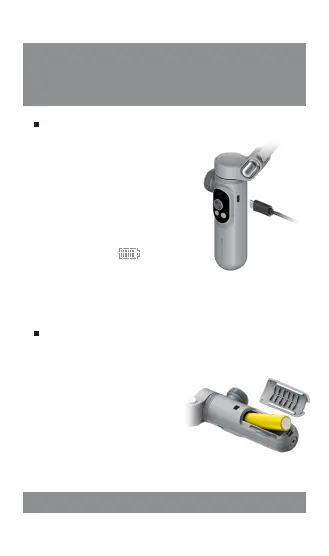
Connect the equipped
Type-C cable with power
adapter via USB port and
with gimbal stabilizer via
Type-C port.
When the LED display is lit
up, it indicates charging
status. When [ ]
symbol appears on the
LED display, it indicates
full battery.
Battery replacement
The SMART X gimbal uses
magnetic battery cover. To
replace Li-battery, please
open the magnetic cover
and remove the used
battery.
18650 Li-battery can be
purchased on AOCHUAN
official store.
SMART X Pro is equipped with original AOCHUAN batter y. For first use, please activate the
battery by fully charging it, so as to ensure its normal use.


 To Next Page