Aode Machinery Co., Ltd Page 19 of 26
奥德机械有限公司 2012
7.3 温 控 器 的 使 用 与 设 定 Using & Setting of Temperature Controller
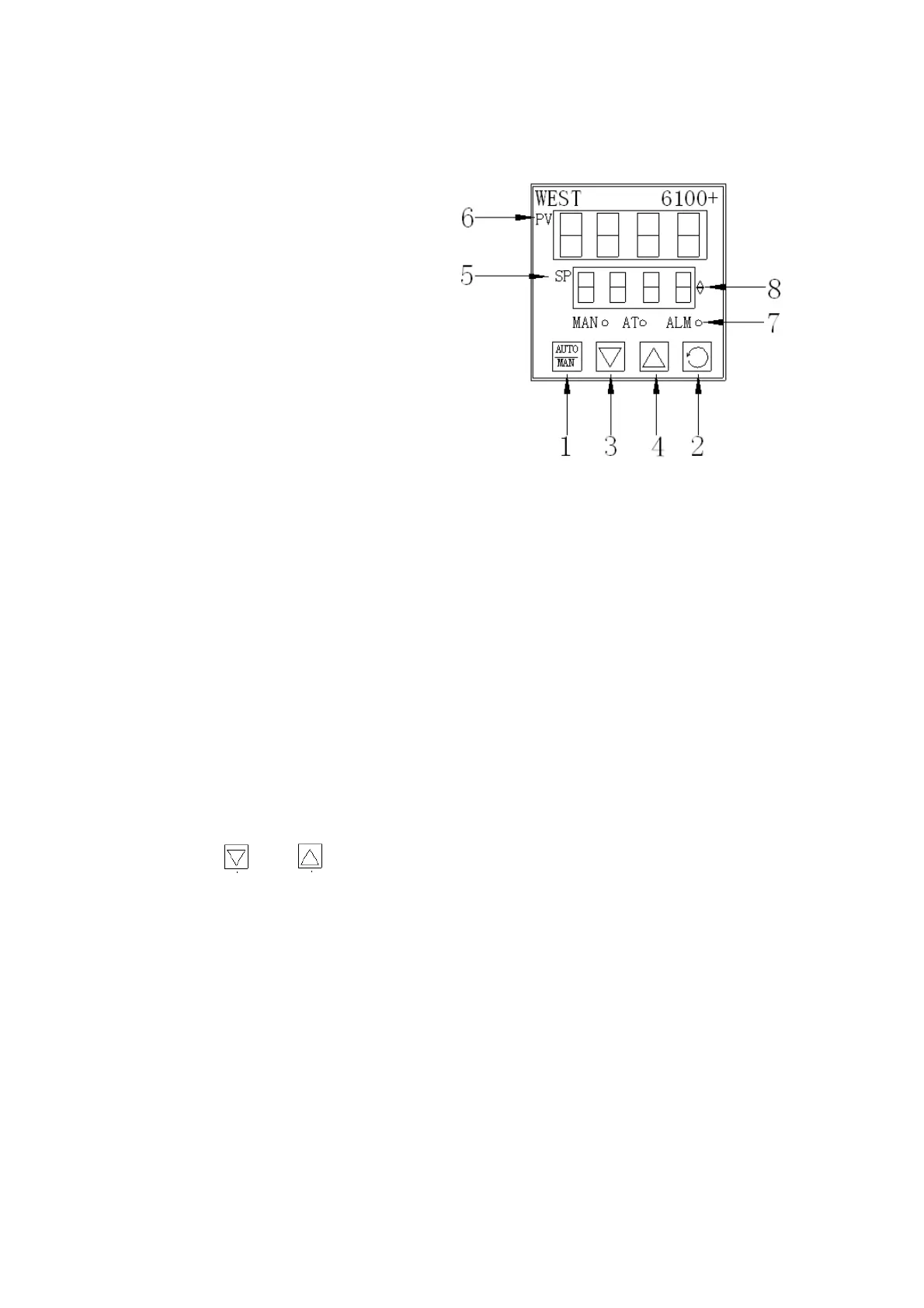
一、WEST P6100 型 (Model WEST P6100):
阶层键:设定內部参数。
Level Key: Set interior parameter.
2. 模能键:設定內部参数转换。
Condition Key: Set transformation of interior parameter.
3. 减少键:用于减少值。如欲降低温度,控此键设定值会下降;如连续按住不放,下降速度
会加快。
Down Key: Decrease values. Press it to decrease temperature; press and hold to speed
up the decrease.
4. 增加键:用于增加值。如欲提高温度,控此键设定值会上升;如连续按住不放,上升速度
会加快。
Up Key: Increase values. Press it to increase temperature; press and hold to speed up
the increase.
5. SP:设定温度显示。Display the setting temperature value.
6. PV:实际温度显示。Display the practical temperature value.
7. 状况讯号指示灯。Indicator light of condition and signal.
8. 加热冷却讯号指示灯。Indicator light of heating and cooling signal.
注: 客户设定温度只需按 增加 和 减少 键,其他按键请勿动。
Note: Just press and to set the temperature. Do not press other keys.
附加:当采用双仪表来进行远程设置时,需对现场仪表进行如下操作
Addition: When using double instruments for remote setting, the following operation is needed
for local instrument.
1. 按 2 号模能键,进入设置画面 Press condition key NO.2, then enter setting screen.
2. 按 2 号模能键翻滚 Rolling when press condition key NO.2.
3. 当选择 PV 区显示显示-LSP 时,仪表设定值由本仪表控制
When choose PV to display LSP, setting value is controlled by instrument.
4. 当选择 PV 区显示显示-RSP 时,仪表设定值由远程仪表控制
When choose PV to display RSP, setting value is controlled by remote instrument.
5. 选择好后按 1 键确认
After choosing, press 1 key to confirm.


 To Next Page
 Loading...