
 Need help?
Do you have a question about the AORUS C700 GLASS and is the answer not in the manual?
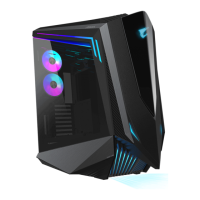
Identifies key external and internal components of the AORUS C700 GLASS chassis.
Details the I/O ports and RGB lighting connections for system integration.
Provides instructions on how to remove the computer chassis panels for access.
Details support for vertical and horizontal graphics card installations.
Provides instructions for installing the power supply unit (PSU).
Explains the RGB and fan control system, including connections and modes.
Details the installation of water cooling radiators and case fans.
Guides the installation of internal 2.5" SSDs and 3.5" HDDs.
 General
| Model | AORUS C700 GLASS |
|---|---|
| Case Form Factor | Full Tower |
| Material | Steel, Tempered Glass |
| Motherboard Support | E-ATX, ATX, Micro-ATX, Mini-ITX |
| 3.5" Drive Bays | 4 |
| 2.5" Drive Bays | 4 |
| 5.25" Drive Bays | 0 |
| I/O Panel | USB 3.0 |
| Pre-installed Fans | 3 x 120mm (Front) |
| Fan Support | Front: 3 x 120mm or 2 x 140mm, Top: 3 x 120mm or 2 x 140mm, Rear: 1 x 120mm or 140mm |
| Radiator Support | Front: Up to 420mm, Top: Up to 360mm, Rear: Up to 140mm |

 To Next Page