EasyManua.ls Logo

aoyue Int863 - User Manual

aoyue Int863
6 pages
Print Icon
To Next Page IconTo Next Page
Loading...
12
!
BASIC TROUBLESHOOTING GUIDE
PROBLEM 1: THE UNIT HAS NO POWER
1. Check if the unit is switched ON.
2. Check the fuse. Replace with the same type if fuse is blown.
3. Check the power cord and ensure there are no disconnections.
4. Verify that the unit is properly connected to the power source.
PROBLEM 2: PANEL DISPLAYS “Err” MESSAGES
DESCRIPTION: Display show “SEnS” “Err” messages. \
ERR0 — First external temperature probe not detected
ERR1 — Second external temperature probe not detected
ERR2 — Internal temperature probe not detected
ERR3 — First external temperature probe not attached.
SOLUTION: Turn off power and back on.
If err messages shows err0 or err1 check the connection of sensor to its
receptacle. Check if the temperature probe tip is still intact.
If err messages shows err2 internal temperature connector might have come
loose or needs to be replaced.
If err messages shows err3, the first external temperature probe was not
detected, secure the external temperature on the underside of the board to be
worked on.
PROBLEM 3: DISPLAY AND OTHER DEVICE OPERATION
ISSUES
SOLUTION: Turn off power and back on.
OTHER PROBLEMS NOT MENTIONED:
Contact the vendor.
!
IR-Preheating System!
Int863!
INSTRUCTION MANUAL!
Thank you for purchasing Aoyue Int863 IR-Preheating System.
It is important to read the manual before using the equipment.
Please keep manual in accessible place for future reference.
This manual is designed to familiarize the technician with
the proper operation and maintenance of the equipment.
The “Care and Safety Precautions section explains the
hazards of using any type of soldering or reworking device.
Please read carefully and observe the guidelines in order to
Question and Answer IconNeed help?

Do you have a question about the aoyue Int863 and is the answer not in the manual?

Summary

BASIC TROUBLESHOOTING GUIDE

PROBLEM 1: THE UNIT HAS NO POWER

Steps to diagnose and resolve power issues for the unit.

PROBLEM 2: PANEL DISPLAYS Err MESSAGES

Explains "Err" messages and solutions related to temperature probes.

PROBLEM 3: DISPLAY AND OTHER DEVICE OPERATION ISSUES

Solutions for general display and operation problems.

OPERATING PROCEDURES

Profile Analysis

Details on analyzing temperature profiles and calculating slopes.

D. TYPE 2 OPERATION

Step-by-step guide for using Type "2" operation mode.

D. TYPE 1 OPERATION

Guide for using Type "1" operation mode with temperature monitoring.

Type 1 Operation Details

Further details on Type "1" operation, temperature adjustments, and probe identification.

A. INITIAL PROCEDURES

Steps to follow before starting any operation type.

B. OPERATION TYPE(MODE) SELECTION

Guide on selecting between different operation types (0, 1, 2).

C. TYPE 0 OPERATION

Details on using Type "0" operation with internal temperature sensor control.

CARE & SAFETY PRECAUTIONS

General Safety Precautions

Essential safety warnings and handling instructions to prevent injury.

PRODUCT DESCRIPTION

Product Overview

Overview of the Aoyue Int863 IR-Preheating System.

FUNCTIONS AND FEATURES

Key Capabilities

Lists the main functions and features of the IR-Preheating System.

PACKAGE INCLUSION

Included Components

Lists the items included in the package with the main unit.

SPECIFICATIONS

Technical Specifications

Provides technical details such as power, dimensions, and temperature range.

CONTROL PANEL GUIDE

Panel Components and Legend

Identifies and explains the functions of the control panel elements.

Suffix Guide

Explains the meaning of suffixes used in display readouts.

Overview

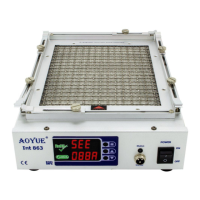
The Aoyue Int863 IR-Preheating System is a microprocessor-controlled, ESD-safe reworking equipment that integrates infrared (IR) heating technology, an enhanced pre-heating area, a versatile board holder, and profile control of heating. It is specifically designed for reworking double-sided, diverse technology printed circuit boards (PCBs) that utilize traditional or lead-free solder. The system is equipped with high-powered IR-heating elements and offers multiple types of preheating operations with built-in safety controls for heat and overheat protection. Its unique, innovative design, coupled with a digital control panel, ensures precision, safety, and ease of use to meet various reworking requirements.

Function Description:

The Aoyue Int863 system is primarily used for preheating PCBs during soldering and desoldering operations. It employs infrared heat wave technology to provide controlled and even heating, which helps prevent board warping and ensures stable temperature measurements. The device offers three distinct modes of operation (Type 0, Type 1, and Type 2) to suit different reworking requirements, allowing for flexibility in controlling the heating process.

Important Technical Specifications:

  • Power Input: Available in 110V / 220V.
  • Dimensions: 450(l) x 260(w) x 80(h) mm.
  • Power Consumption: 850W (maximum).
  • Temperature Range: 50°C - 400°C (maximum, depends on type of operation).
  • Heating Element: IR Heating.
  • Pre-Heating Area: 250mm x 200mm.
  • Control System: Closed loop system for precise temperature control.
  • Temperature Sensors: Built-in internal temperature sensor, and two external temperature probes (color-coded: red and blue pair for the first, all white for the second).

Usage Features:

  • Versatile Board Holder: Designed to fit various board types, accommodating large PCBs and minimizing board warping.
  • Digital Display: Features a top and bottom display for showing settings (e.g., "Set," "Act1," "Act2," "Act3," "SEG1") and actual temperatures or times.
  • Suffix Guide: Uses suffixes (A, b, c, d, t, C) to indicate displayed values:
    • A: Set temperature for Type 0 and 1 operation.
    • b: Actual Temperature of Sensor 1.
    • c: Actual Temperature of Sensor 2. d: Actual Temperature of Internal Sensor.
    • t: Set duration/time (seconds) for profile.
    • C: Set Temperature for profile.
  • Three Modes of Operation:
    • Type 0 Operation: Utilizes the internal temperature sensor to control heat, freeing up external probes for additional monitoring (e.g., bottom and top of the board near components). Temperature is adjustable from 50 to 400°C.
    • Type 1 Operation: Uses the first external temperature sensor to control heat, allowing for close temperature control at the board level. The second external probe can be used for additional monitoring. Temperature is adjustable from 50 to 280°C.
    • Type 2 Operation (Profile Mode): Attaches the first external temperature probe to the underside of the PCB for heat control. This mode uses a customizable profile to slowly control the rise and fall of temperature at the board level. The second external probe can be used for additional monitoring. Users can adjust time (5 to 200 seconds) and temperature (50 to 250°C) for each segment of the profile.
  • Profile Adjustment Functionality: Allows users to automate reworking tasks with user-defined temperature and time settings. Profile settings are stored in CPU memory for easy configuration.
  • Safety Features: Includes a built-in protection feature that automatically limits the temperature rising slope to no more than 3 degrees per second. This prevents rapid temperature increases that could damage components.
  • Compatibility: Compatible for use with either hot air or IR top heating systems.
  • Easy-to-Adjust Pre-heat Temperatures: Digital display facilitates precise temperature adjustments.
  • Monitoring: Allows for viewing of actual temperatures from internal and external probes, as well as running time and current segment in profile mode.

Maintenance Features:

  • Troubleshooting Guide: Provides solutions for common issues such as "No Power" (checking ON switch, fuse, power cord) and "Err" messages (checking sensor connections, probe integrity, internal connector, external probe attachment).
  • Error Codes:
    • ERR0: First external temperature probe not detected.
    • ERR1: Second external temperature probe not detected.
    • ERR2: Internal temperature probe not detected.
    • ERR3: First external temperature probe not attached.
  • General Maintenance Guidelines:
    • Disconnect plug from main power source if the device will not be used for a long period.
    • Turn off power during breaks, if possible.
    • Allow ample time for the equipment to cool down before commencing maintenance.
    • Use only genuine replacement parts.
  • Contact Vendor: For other problems not mentioned in the troubleshooting guide.

Safety Precautions:

  • Temperature may reach as high as 500°C when turned ON. Avoid touching the heating element and prolonged exposure to infra-red light, which can damage skin tissue.
  • Handle with care: Do not drop or sharply jolt the unit, as it contains delicate IR tubes.
  • Do not spill any liquid onto the system.
  • Do not tamper with the electrical control unit or internal wiring.

aoyue Int863 Specifications

General IconGeneral
Brandaoyue
ModelInt863
CategoryLaboratory Equipment
LanguageEnglish