15
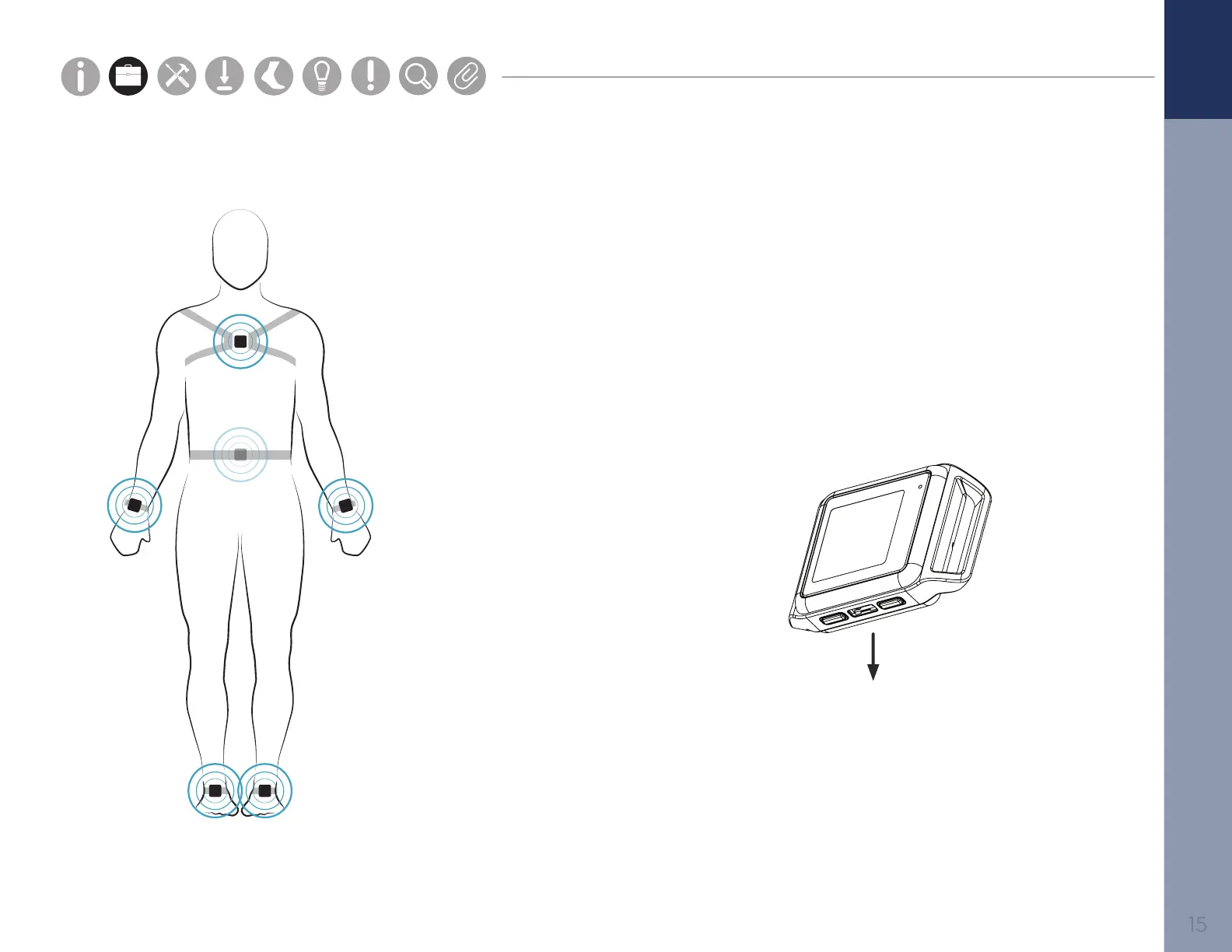
Your Mobility Lab system comes with all or some of the sensors shown.
To upgrade your system, contact us at sales@apdm.com.
Sensor Placement
Foot
Centered on top of the foot
Lumbar
Centered on the low back, at
the base of the spine
Sternum
Centered on the at surface
of the chest just below where
the collar bones meet
Wrist
On the wrist worn like a watch
Parts
Setup M.L. How to
M.L. Software Download Troubleshooting
Hardware Cong
Tech Stats/Info
Parts
Setup M.L. How to
M.L. Software Download Troubleshooting
Hardware Cong
Tech Stats/Info
Parts
Setup M.L. How to
M.L. Software Download Troubleshooting
Hardware Cong
Tech Stats/Info
Parts
Setup M.L. How to
M.L. Software Download Troubleshooting
Hardware Cong
Tech Stats/Info
Parts
Setup M.L. How to
M.L. Software Download Troubleshooting
Hardware Cong
Tech Stats/Info
Parts
Setup M.L. How to
M.L. Software Download Troubleshooting
Hardware Cong
Tech Stats/Info
Parts
Setup M.L. How to
M.L. Software Download Troubleshooting
Hardware Cong
Tech Stats/Info
Always place the Opal
port-side down



 To Next Page