- 04 -
LED Power Indications:
Self-leveling Mode
●
●
Manual Mode
●
●
●
Pulse Mode
●
●
●
Note:
Due to product improvement,appearance and specifications may differ Working distance varies
depending on the operating environment.
Charging
The machine is equipped with 3.7V lithium battery, which is built-in and non-removable.
if battery is low or no power after starting up.you can charge machine directly.
Please use the adapter with DC 5V and 1A/2A to charge it, the charging port is the Type C port.
The battery icon will be displayed in scrollable way during charging process.
The battery icon will be displayed after the battery is full charged.
Operation Modes
is enabled when the pendulum switch(2) is switched to the unlocked position.
The laser beam(s) blink fast when tool is out of self-leveling range(±4 °).
is enabled when the pendulum switch(2) is switched to the locked position.
is enabled to position the laser tool at various angles to project non-level straight lines or points.
The laser beam(s) will blink about every 3-5 seconds to notify the user. Notice: The laser beam(s)
projected in manual mode cannot be used as a horizontal or vertical reference in nature
Under pulse mode, Laser tool can work with a laser detector for working in a brighter environment
or a larger working distance
Long press the power button to turn on the Pulse Mode.
Long press the power button again to return back Normal Mode. Notice: The laser beam is dimmer
in pulse mode.
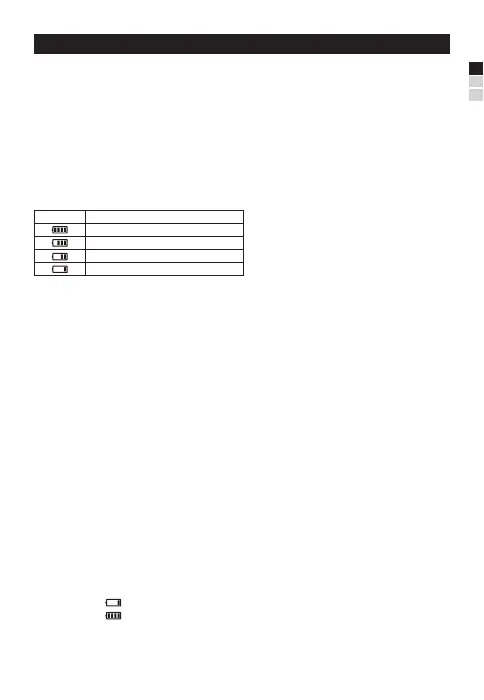
LED
Capacity
75%-100%
50%-75%
25%-50%
0%-25%
EN
FR
ES
at initial state, the Pendulum switch(2) on Locked position.
1. Short press the Power button(7) for 0.5s to turn on, the laser line lights up, and short press
again to switch between pulse and normal mode, long press for 2s to shut down the laser line.
2.Push Pendulum switch(2) to Unlock position, then the laser line lights up, and if short press
power button(7) to switch between pulse and normal mode, push Pendulum switch(2) back to
locked postion then laser line is off


 To Next Page
 Loading...