Operating Your 808 Keychain Video
Camera
1. Charging the Battery
Thebatteryinthe808Keychainvideocamera
isabuilt-inlithiumrechargeablebattery.Youshould
recharge it before using the camera.Themethod
for charging is:
Connect the 808 Keychain video camera to
yourcomputerusingthesuppliedUSBcable.
During the charge cycle the yellow light will
ashslowly.Whenitisfullycharged,theyellowlight
willstopashingandremainsteadilyilluminated.
Notice: When battery power is too low, the
camerawillenterintoprotectionmode.Inthisstate,
itcannotbeturnedon.Itshouldberechargedfor
video operations.
2. Turning on the 808 Keychain video camera
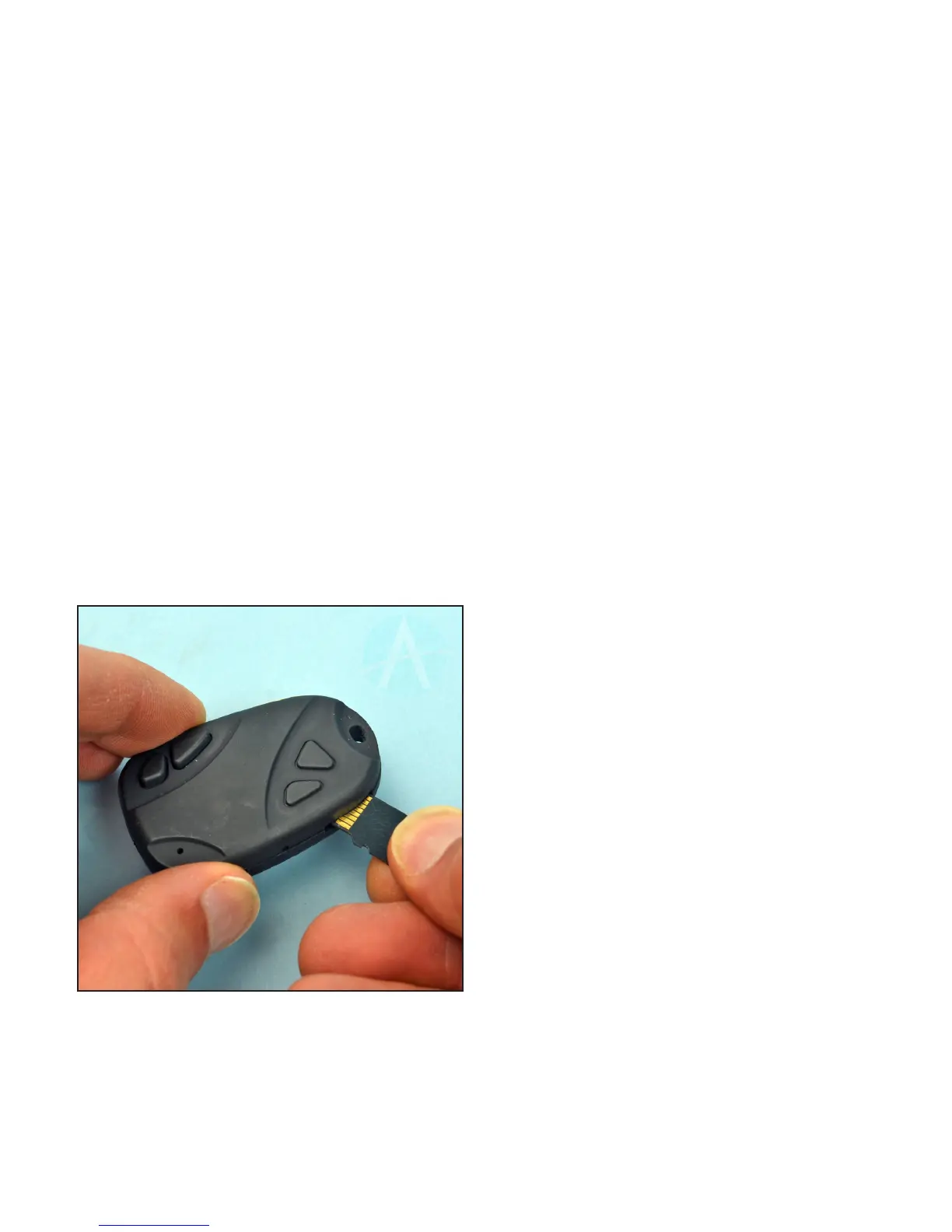
Please conrm the TF (micro SD) card has
already been inserted into the product! This
camera does not come with a TF card, and it
must be supplied by the user of the device. This
cameradoesnotsupportT-ashcardsgreaterthan
16GBofstorage.
NOTE:MakesureaT-Flash(MicroSD)card
hasbeeninsertedbeforeturningonthecamera.If
aT-Flashcardisnotinstalled,theyellowlightwill
beginashing fast,and the camera will poweroff
automatically after 15 seconds.
3. Making a Video Recording
To Start Recording:
Pressandholdthe“VIDEO/CAMERA”button
for 3 seconds. The yellow indicator light will ash
quickly three times, and will then go dark. It is
nowrecordingvideo(itisinstealthmodesoother
peoplecan’t tellit isrecording. Remember, it is a
spycamera).
To Stop Recording:
To stop recording, press-and-release the
“VIDEO/CAMERA”button.Theyellowindicatorlight
will ash briey and then again become steadily
illuminated.
IMPORTANT! Before turning the unit off or
restartingthevideocamera,pauseafewseconds
toallowthevideoletobewrittentothememory
card. Turning on the video camera too soon will
createincompletevideoles.
Thelens isnotdesignedforclose-upvideos.
You’llneedatleast50cm(about20in)betweenthe
lensandthesubjectforproperfocusandtoallow
sufcientillumination.
4. To Take Still Photos
Takingstillphotosiseasy.Whenthecamerais
poweredonandisin“standbymode”(indicatedby
the steady yellow light), simply press-and-release
the“VIDEO/CAMERA”button.Theyellowindicator
light will ash multiple times, which represents a
photoshot.Arepeatedpresswillresultinanother
photo taken.
5. Setting the Time Stamp
Note:Thereisnowaytoturnoffthetime-stamp
onthevideothatweareawareof.(Thetimestamp
may reset every time you plug the camera into your
computer,somakesuretocheckitwhenyouare
preparingtolaunch.)
a.MakesuretheT/Fmemorycardisinserted
into the keychain camera.
b.Connectthe808Keychaincameratoyour
computerusingtheUSBcable.
c.OpentheTAG.txtlewithawordprocessing
program. It is located in the root directory of the
memorycard.Thisleisgeneratedbythecamera
onnewT-ashcards,soyoumayneed to takea
Insert the Micro SD card with the metal contacts
facing upward.
Press and hold the “ON/OFF” button for 3
seconds. The yellow indicator light will illuminate,
indicatingthatthecameraisnowpoweredon,and
isinstandbymode.



 To Next Page
 Loading...