video or photo with the camera rst before you’ll
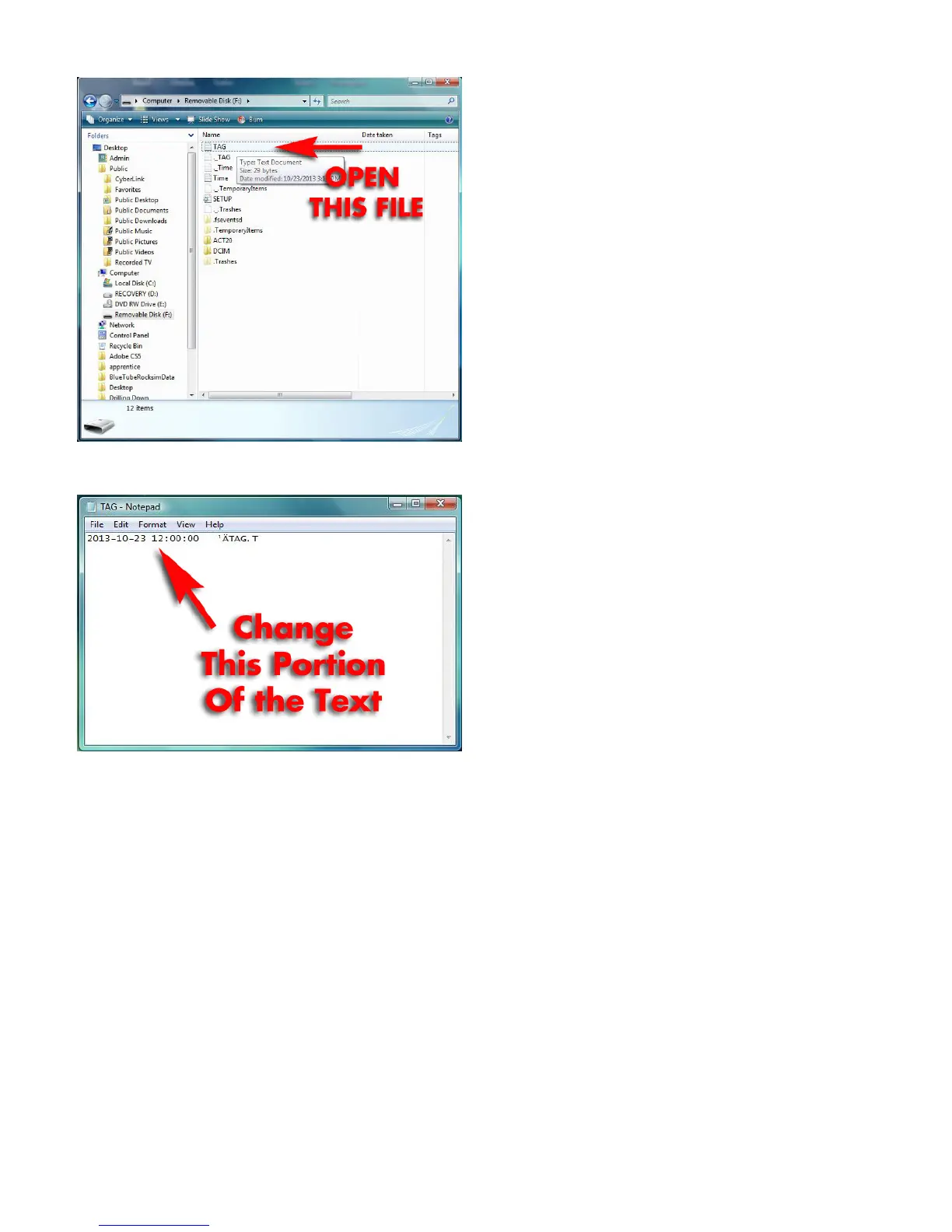
seetheTAG.txtle.
d.Changethetimestampinthisformat:YYYY-
MM-DDHR:MIN:SEC
For example, October 23, 2013 at 12-noon
wouldbe:
2013-10-2312:00:00
Youmaywanttosetthetimeaheadaminute
so that you can have enough time to get the camera
turnedonandthenewtime-stamploaded.
e.Resavetheletothememorycard.Itshould
be.txtformat.
g. Disconnect the camera from the computer
and power it on. Take a short video. Put the camera
backintostand-bymode,andthenturnitoff.
Whenyouloadthevideoontothecomputer,it
willnowhavethenewtime-stampimprintedonit.
6. Turning Power off
Whethecameraisinstandbymode,holdthe
“ON/OFF”button,untilindicatorgoesout.Thenthe
camera is turned off.
7. Auto-power off function
The 808 Keychain camera will save video
lesandturnoffautomaticallyunderthefollowing
conditions:
a.Batterypowerislow:thecamerawilldisable,
thevideolewillbesavedautomatically,andthen
the808Keychaincamerawillpowerdown.
b.When available memory space on theT/F
cardisinsufcient,theindicatorlightwillgoout,the
videolewillbesaved,andthecamerawillpower
down.
c. When in standby mode, without any
operationfor45seconds,itwillbeauto-poweroff.
8. Connecting to your computer
Whenthe808Keychaincameraisconnected
to your computer using the USB cord, your
computershouldrecognizeitjustlikeasimpleUSB
memorystick. Whileconnected toyour computer,
the illumination light will be a steady or ashing
yellowcolor(dependingonifitneedstocharge).
You should see several folders on the
“removable drive.” The folder called “DCIM”
contains the videos and the photos you have taken.
Open the folder, and copy the les you wish to
viewtoyourcomputer.Itisbettertocopytheles
beforetryingtoplaythem,astheywillplaywithless
choppiness.
Use your computer to delete the video les
fromtheT/Fcardtofreeupmemoryspacetotake
more videos. The camera can also be used as a
memorydisktoholdandtransferles.
9. Reset
When the camera doesn’t seem to work
properly, it needs to be reset. Use a stiff rod (a
paper clip works well) to press the Reset button.
TheResetbuttonisintheholeplacedbetweenthe
USBportandTFcardslot.
10. Mounting Options
Youcanremovethekeyringfromthedevice
to save weight. Then use strong electrical tape or
ducttapewrappedoverthe808keychaincamera
to hold it onto your model rocket. Be sure not to
coverupthetwooperationbuttonsnearthelensof
the device.
Open the TAG.txt le to change the time code on
the camera.



 To Next Page
 Loading...