26
1
4
3
2
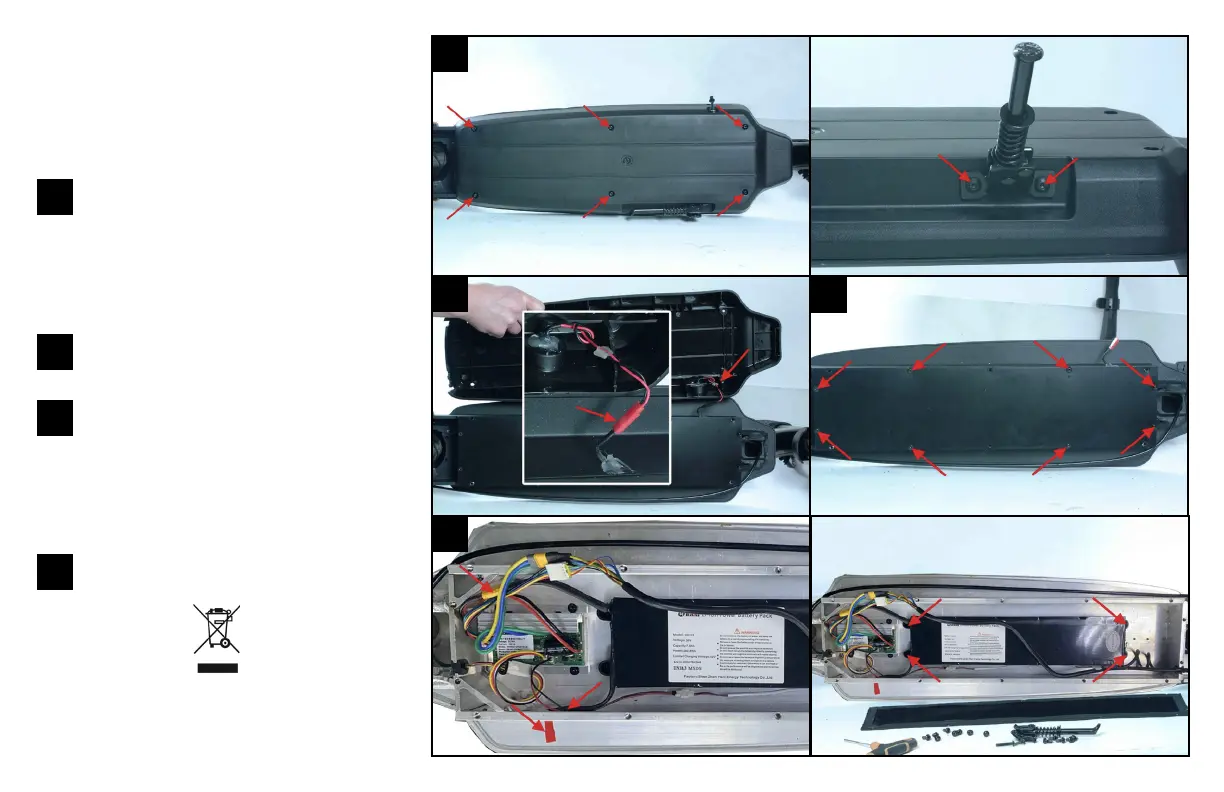
Put the scooter on its side in order to
unscrew the 6 screws connecting the
deck to the frame as well as the 2 screws
fixing the kickstand.
Caution: The battery charging cable is attached to the lower deck, so
carefully remove the lower deck.
With the lower deck removed, discon-
nect the battery charging cable.
You can now access to the water-resis-
tant compartment (the black cover):
unscrew the 8 screws. You can now see the
battery, disconnect the cable connected to
the controller then unscrew the 4 locking
screws to carefully remove the battery.
The battery should be disposed of
safely.
How to remove the battery
Before you do this: The device must be
disconnected from the mains power supply to
remove the battery.
1
2
3
4
This symbol means that this product contains a built-in rechargeable bat-
tery, which must not be disposed of with household waste. Please take
to a recycling centre or collection point or contact the manufacturer.



 To Next Page