• Do not operate this device in a hazardous atmosphere.
• Do not replace or change accessories in a hazardous atmosphere. Contact sparking may occur while installing or removing accessories and
cause an ere.
• Turn a device oefore removing or instaery or accessory.
• Do not disassemevice in any way that exposed the internal electrical circuits of the unit.
• Make sure to refore using the machine. Please keep it in hand for future reference.
English
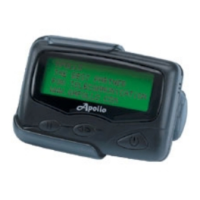
Alphanumeric Pager
AP-900 User Manual
762-00111-0
Overview & Basic Operation
Icon
Operation
LCD
1
Pager chain
5
8
6
7
2
• Preview message
3
• Show function menu
• Select or save function setting
4
• Read message
• Turn on backlight
(hold button for a second)
1
5
43 6
7
82
Pager StaS
POWER ON INDICATOR
MUSIC ALERT
BEEP ALERT
AUTO SLEEP INDICATOR
ALARM INDICATOR
AUTO SCROLL INDICATOR
BATTERY CAPACITY
OUT OF RANGE INDICATOR
ge StaS
ERROR MESSAGE
DUPLICATE MESSAGE INDICATOR
MAIL DROP MESSAGE INDICATOR
PERSONAL MESSAGE
LOCKED MESSAGE
MEMO MESSAGE FOLDER / INDICATOR
FULL MESSAGE FOLDER
MAILDROP FOLDER
MAILDROP FOLDER (ALERT ON)
DUPLICATE MESSAGE INDICATOR
S
SET SCROLL
SET TIME
SET ALARM
AUTO SLEEP SET
PAGER OFF
SET ALERT
CAPCODE SET
ESCAPE
MESSAGE UNLOCK
1. Press or to move the cursor to the
message you want to lock.
2. Press , then select .
3. Press again to lock the message.
locked, you can select to unlock the message.
LOCK MESSAGE
MESSAGE DELETE
DELETE ALL
MOVE TO MEMO
MESSAGE LOCK
energy level. The three indicators range from
( full), (1/2), (low). Whenever the
BATTERY GAUGE
unread message/maildrop.
maildrop.
3.Press to read the message.
4.Press again to view the next page.
※
If you have set "Auto Scroll," the pager will
READ MESSAGE
1. Press or to move the cursor to the
full message folder.
2. Press to read the message.
• The
into the full message folder.
READ FULL MESSAGE
/
ZOOM IN / OUT
/
/
/
/
/
/
/


 To Next Page
 Need help?

 General