iBook G4 (12-inch Mid 2005) Additional Procedures
Checking the Optical Drive Cable
Procedure
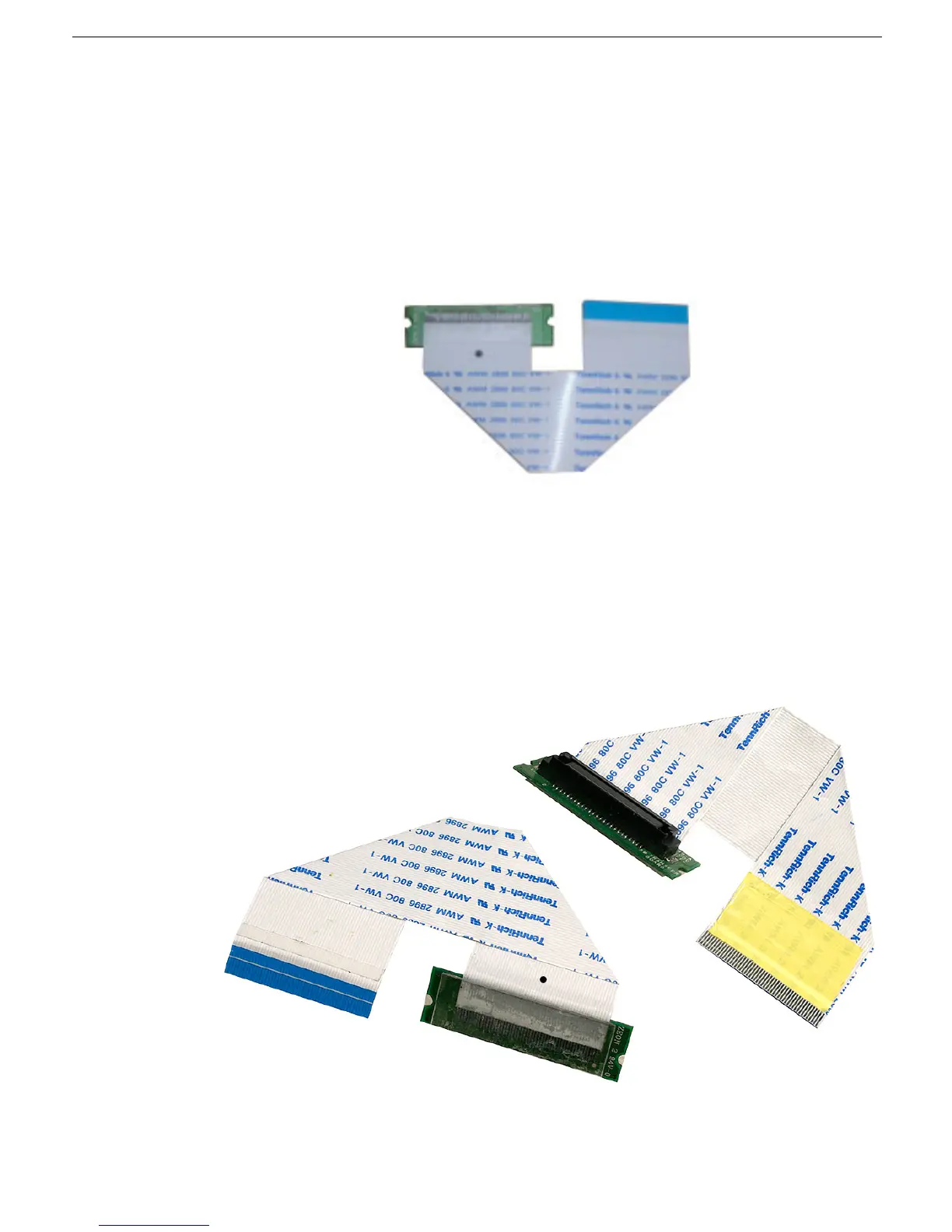
1. Check the cable for the supplier designation.
2. If the flex cable has a "TennRich" designation,
• Check for a black dot near the cable end that connects to the optical drive. If there
is no black dot, replace the optical drive cable.
• If there is a black dot on the TennRich cable, the cable is good, and no further
steps are needed.
3. If the cable has another supplier's designation, disconnect the cable from the logic
board and check the underside of the cable for yellow tape that covers the cable in the
area shown.
• If there is no tape, tape the area to cover these dimensions 24 mm x 12.5 mm.
Make sure the yellow tape is 12.5 mm long, covers the full width of the cable, and
does not cover any part of the connector contacts to the logic board.
• If there is yellow tape and it correctly covers the area shown, the cable is good.
Note:
This procedure applies to all suppliers of the optical drive flex cable for this
computer.



 To Next Page