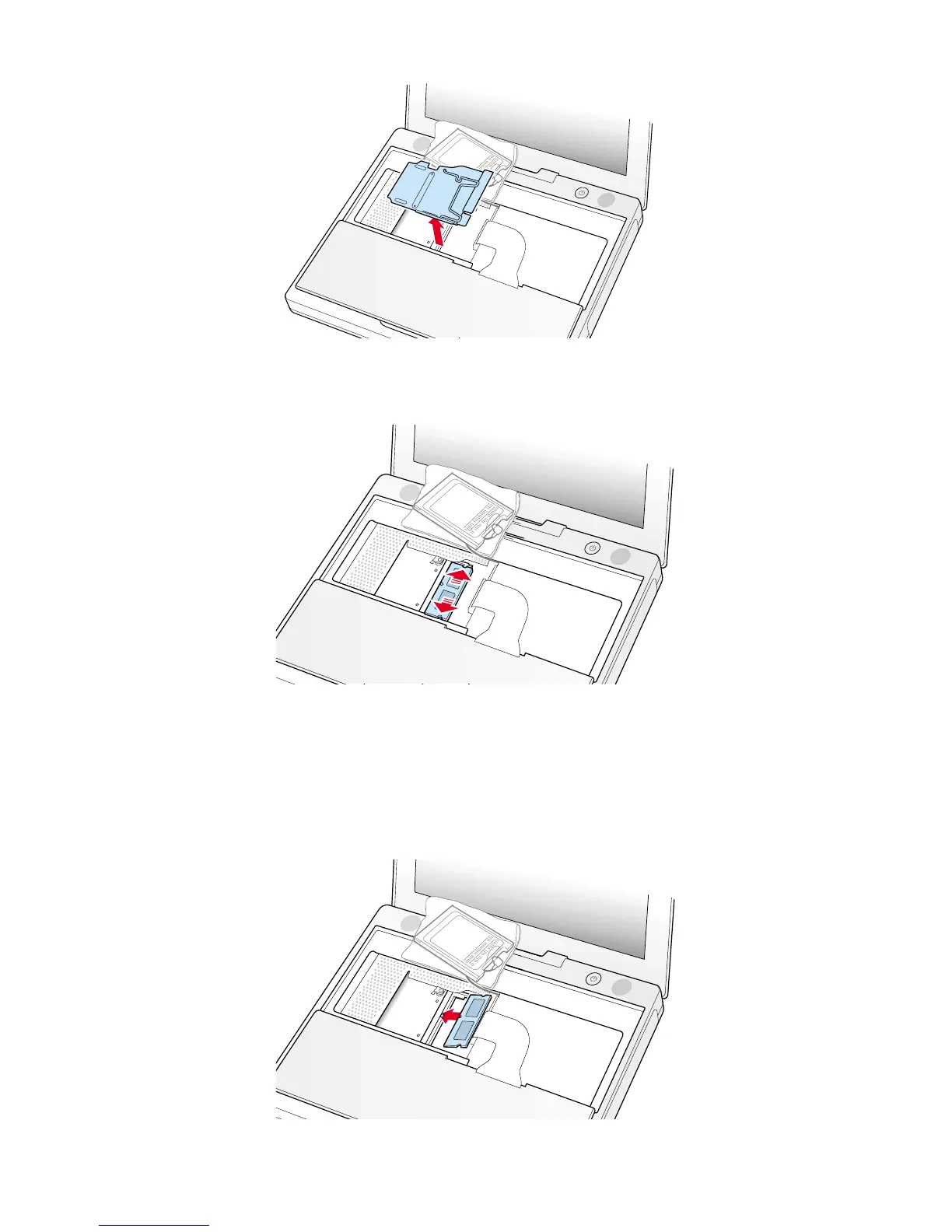
5. Lift the RAM shield out of the computer. Carefully pulling up on the wire holder may help to remove the shield (Figure 8).
6. Locate the installed memory card and brackets that secure the card on both sides (Figure 9).
7. Carefully spread the brackets apart until the card releases on each side. Pull the card up and out of the memory slot.
Installing the Replacement Memory Card
1. Line up the notch in the replacement memory card with the small tab in the memory slot. Hold the card at a 30-degree
angle, then push the card into the slot until it is firmly seated (Figure 10).
Note : If you feel resistance when inserting the card, try pushing one side at a time.
4 iBook (Dual USB - Late 2001 - 14.1 LCD - 16 VRAM - 14.1 LCD 16 VRAM) - Memory
Figure 8
Figure 9
Figure 10



 To Next Page