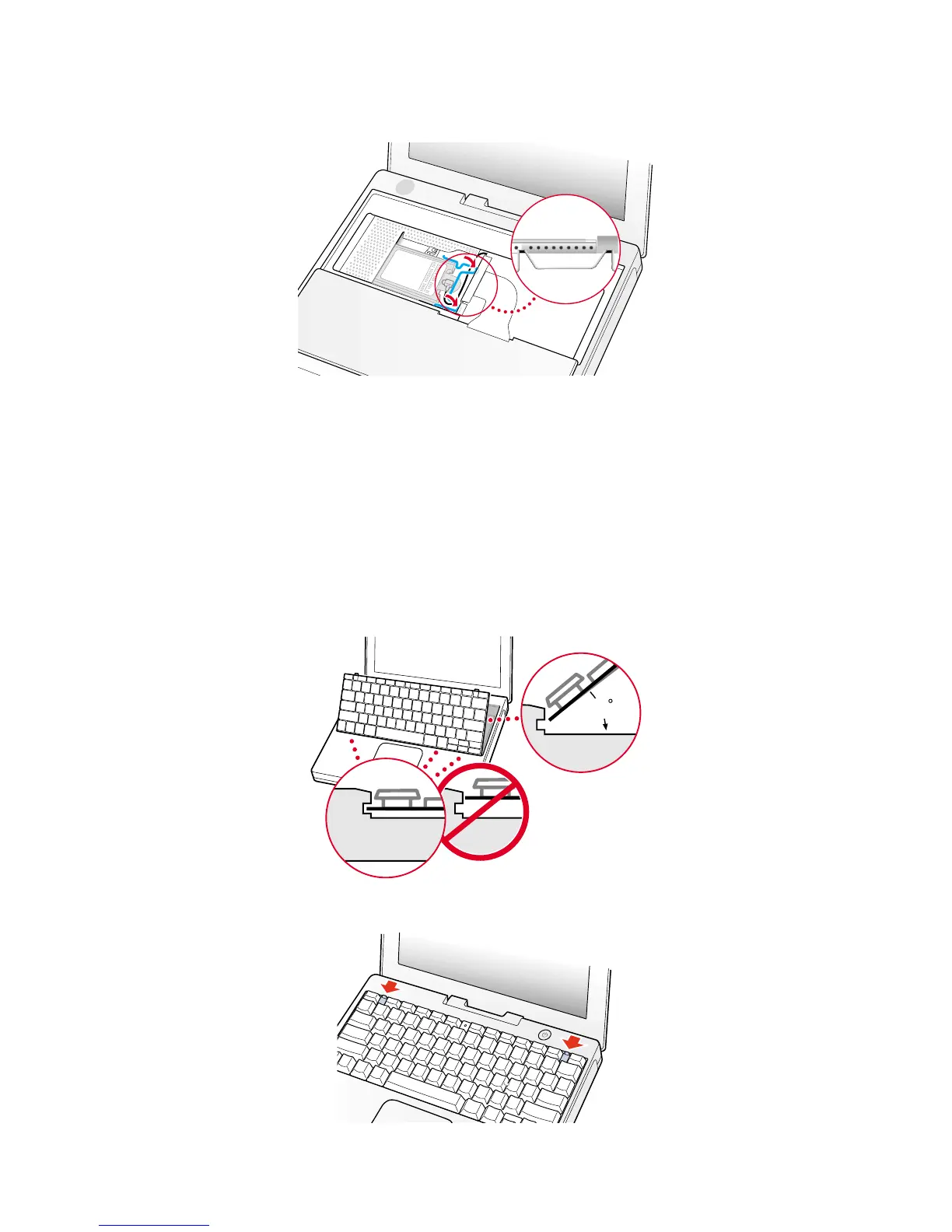
8. If you have an AirPort Card, gently slide it (with the AirPort ID number and bar code facing up) under the wire bracket and
securely into the AirPort Card slot.
9. Use the wire holder to secure the AirPort Card in place by inserting its prongs into the slots in the RAM shield (Figure 14).
Closing the Computer
1. Flip the keyboard back toward the keyboard opening in the case.
2. Hold the keyboard at a 45-degree angle above the keyboard opening, and insert the tabs on the bottom edge of the key-
board into the slot under the edge of the opening.
Important : Make sure that all the tabs are seated and that the keyboard rests flush against the edge of the opening
(Figure 15).
3. Lay the keyboard flat into the keyboard opening.
4. Pull down on the keyboard release tabs and then press down on the top portion of the keyboard (Figure 16).
6 iBook (Dual USB - Late 2001 - 14.1 LCD - 16 VRAM - 14.1 LCD 16 VRAM) - Memory
Figure 14



 To Next Page