Installing the Replacement AirPort Card
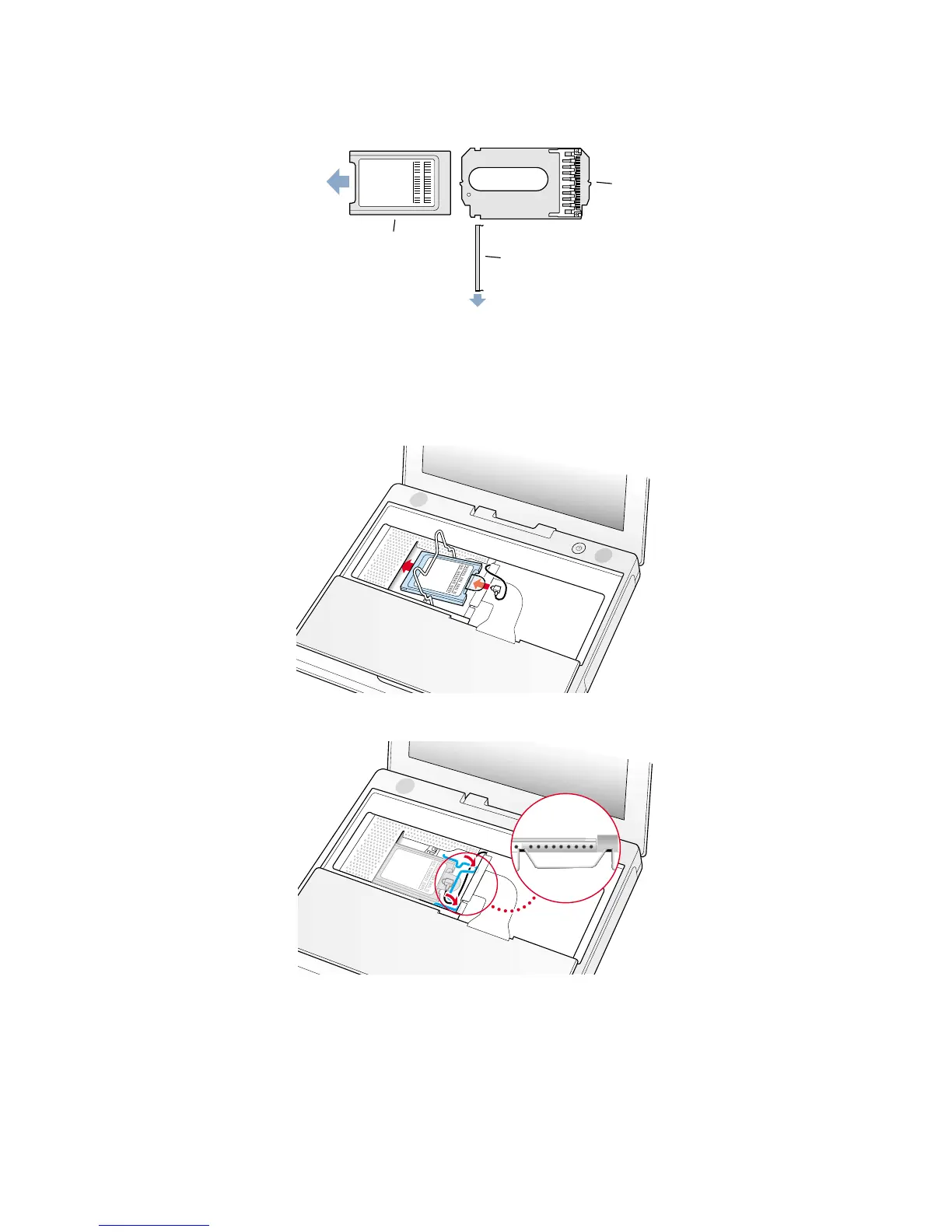
1. If the AirPort Card came with the AirPort adapter (Figure 7), remove the metal clip (A) and pull the AirPort Card (B) from
the adapter (C). The adapter and metal clip are not used with your iBook.
2. Locate the AirPort antenna cable connector and plug it into the port (located just below the pull-tab) on the end of the
AirPort Card. Make sure the connector is straight before inserting it into the card (Figure 8).
3. To install the AirPort Card, gently slide it (with the AirPort ID number and bar code facing up) under the wire bracket and
securely into the AirPort Card slot.
4. Use the wire holder to secure the AirPort Card in place by inserting its prongs into the slots in the RAM shield (Figure 9).
4
iBook (Dual USB - Late 2001 - 14.1 LCD - 16 VRAM - 14.1 LCD 16 VRAM) - AirPort Card
Figure 8
Figure 9



 To Next Page