174
|
Chapter 20
10. Tap the Full Screen on/off switch. When turned ON, more text appears on
the screen.
11. Tap anywhere on the page to make the Font menu disappear.
Additional Ideas for Reading Ebooks
There’s a saying that goes, “Leaders are readers.” With iBooks, you can easily carry
and read all types of books to help you become a better person, whether you want
to read for work, pleasure, or education.
If you purchased Amazon’s Kindle or Barnes & Noble’s NOOK and bought
Kindle or NOOK ebooks, download the free Kindle or NOOK app for your iPad,
and you can transfer and read all your Kindle or NOOK ebooks on your iPad. Now
your investment in all those ebooks won’t be a waste of money when you wind
up carrying your iPad everywhere and leaving your old reader to collect dust in
acloset.
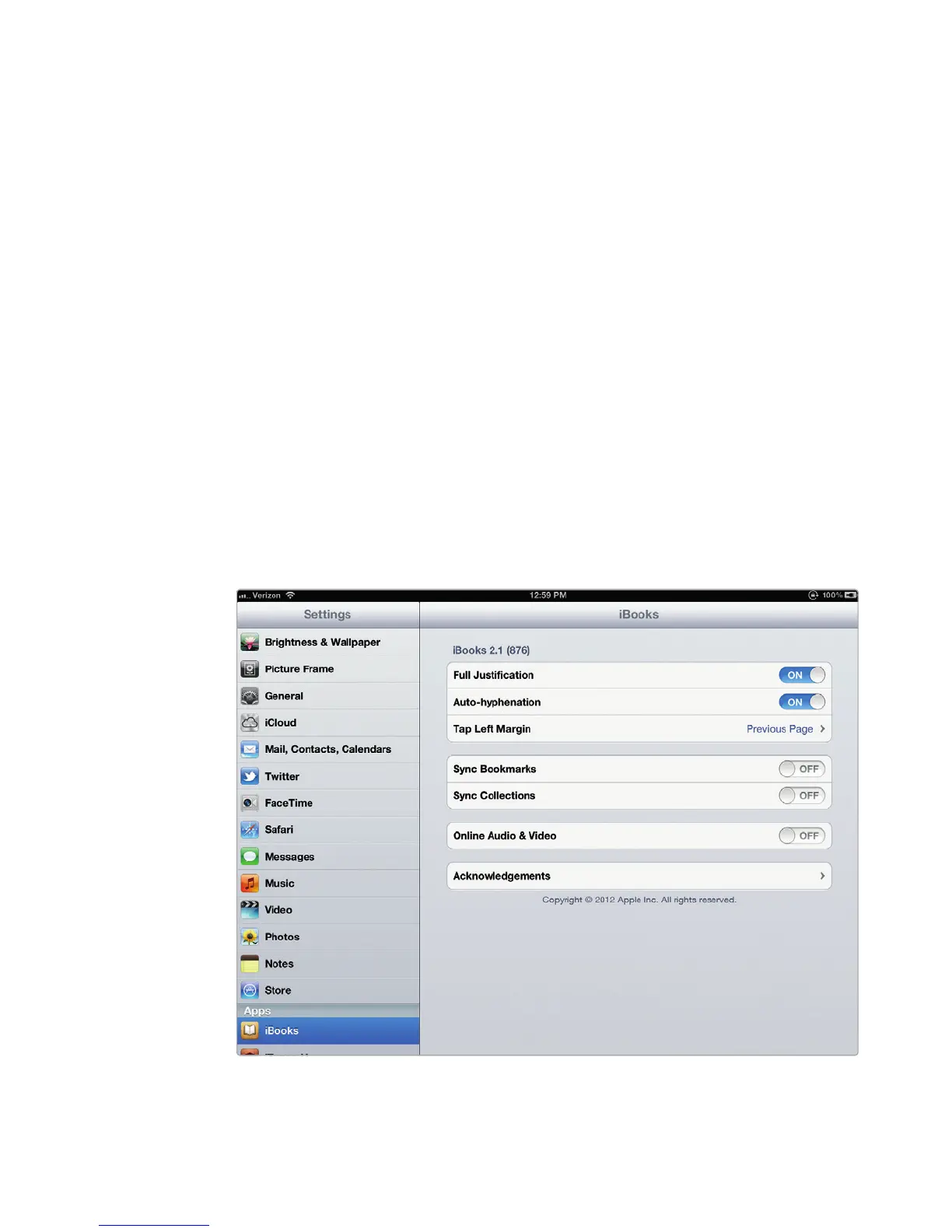
If you also read ebooks on your iPhone or computer, you can sync your
iBooks across devices. Just tap Settings from the Home screen and then tap
iBooks (under the Apps category on the left-hand side) to view your iBooks syn-
chronization options, as shown in Figure 20-16.
As ebooks grow in popularity, you can expect to find more choices covering
a wide variety of topics, so you should never run out of reading material, unless
your iPad runs out of battery power first.
FIGURE 20-16: Apple will sync your iBooks and bookmarks between devices.



 To Next Page