74
|
Chapter 10
Canceling (or Switching) a Cellular Data Plan
When you sign up for a data plan, it runs for a fixed amount of time, such as 30days,
starting with the date that you signed up for that data plan. You’ll receive three alerts
when your data plan limit reaches 20 percent, 10 percent, and zero. Each alert gives
you the chance to sign up for your current plan or choose a different plan.
Your data plan will automatically renew every time period until you specifi-
cally turn it off. To turn off (or switch) your data plan, follow these steps:
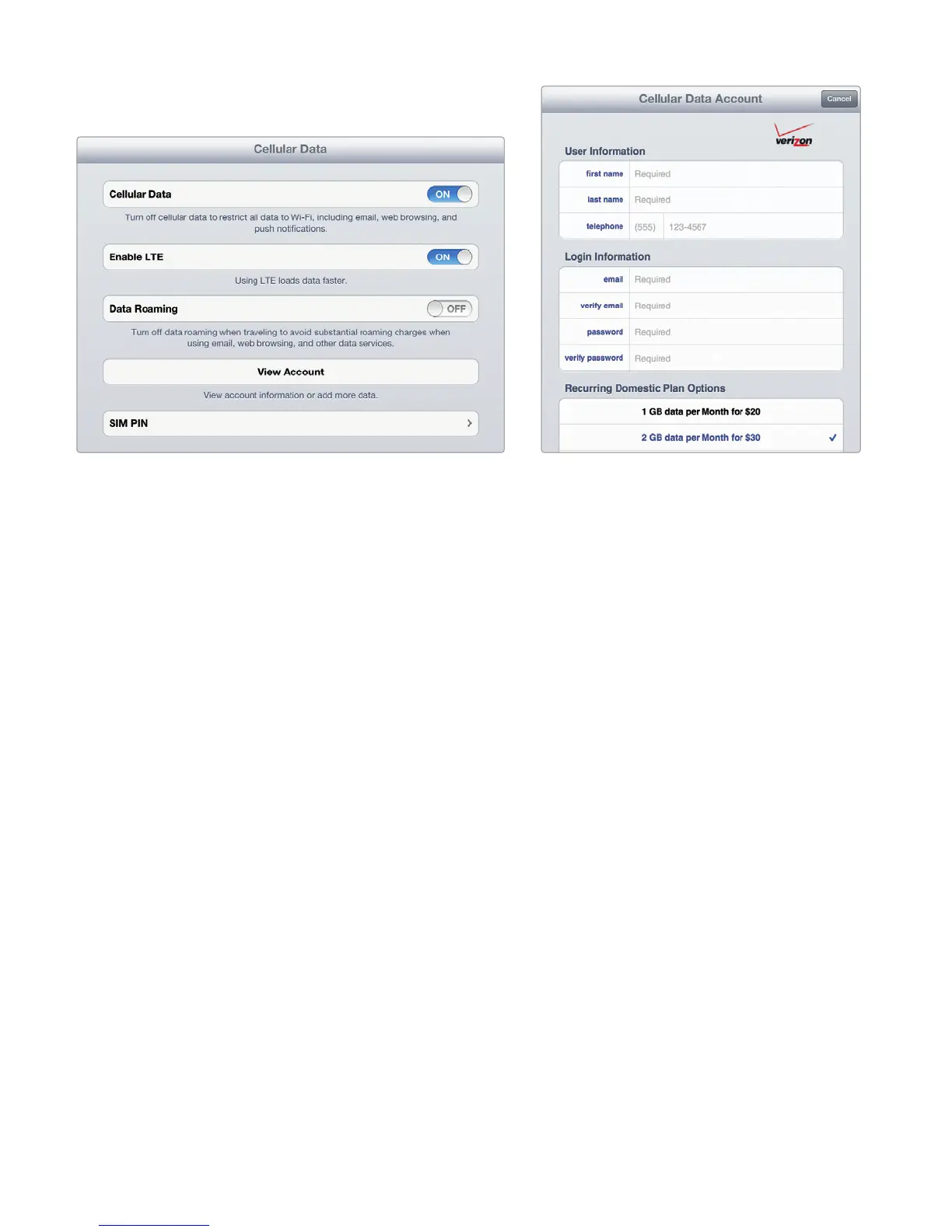
1. From the Home screen, tap Settings. The Settings screen appears.
2. Tap Cellular Data. The Cellular Data settings screen appears (see Figure10-2).
3. Tap View Account. (You’ll need to type your email address and password to
access your account.) The Cellular Data Account window appears showing
your current data plan.
4. Tap Cancel Plan or one of the other data plan buttons to switch to that
dataplan.
Turning Your iPad Into a Wi-Fi Hotspot
Once you purchase a cellular data plan, you can share your Internet connection with
others through Wi-Fi. Just remember that sharing your Internet connection uses up
your monthly data allotment.
FIGURE 10-2: The Cellular Data settings screen lets
you define cellular data settings.
FIGURE 10-3: The Cellular Data Account
window lets you choose a data plan.



 To Next Page