iPad Basics — Hardware Information 21
2010-04-30
Micro-SIM Card
For cellular data, iPad WiFi + 3G uses a micro-SIM card. Changing cellular data carriers for an
iPad WiFi + 3G requires changing the mico-SIM card.
Note: iPhone SIM cards are not compatible with iPad WiFi + 3G and are physically larger than
iPad micro-SIM cards.
Micro-SIM Service Strategy
Micro-SIM cards are replaceable by the cellular carrier. If iPad WiFi + 3G requires a SIM
replacement, refer the customer to the carrier.
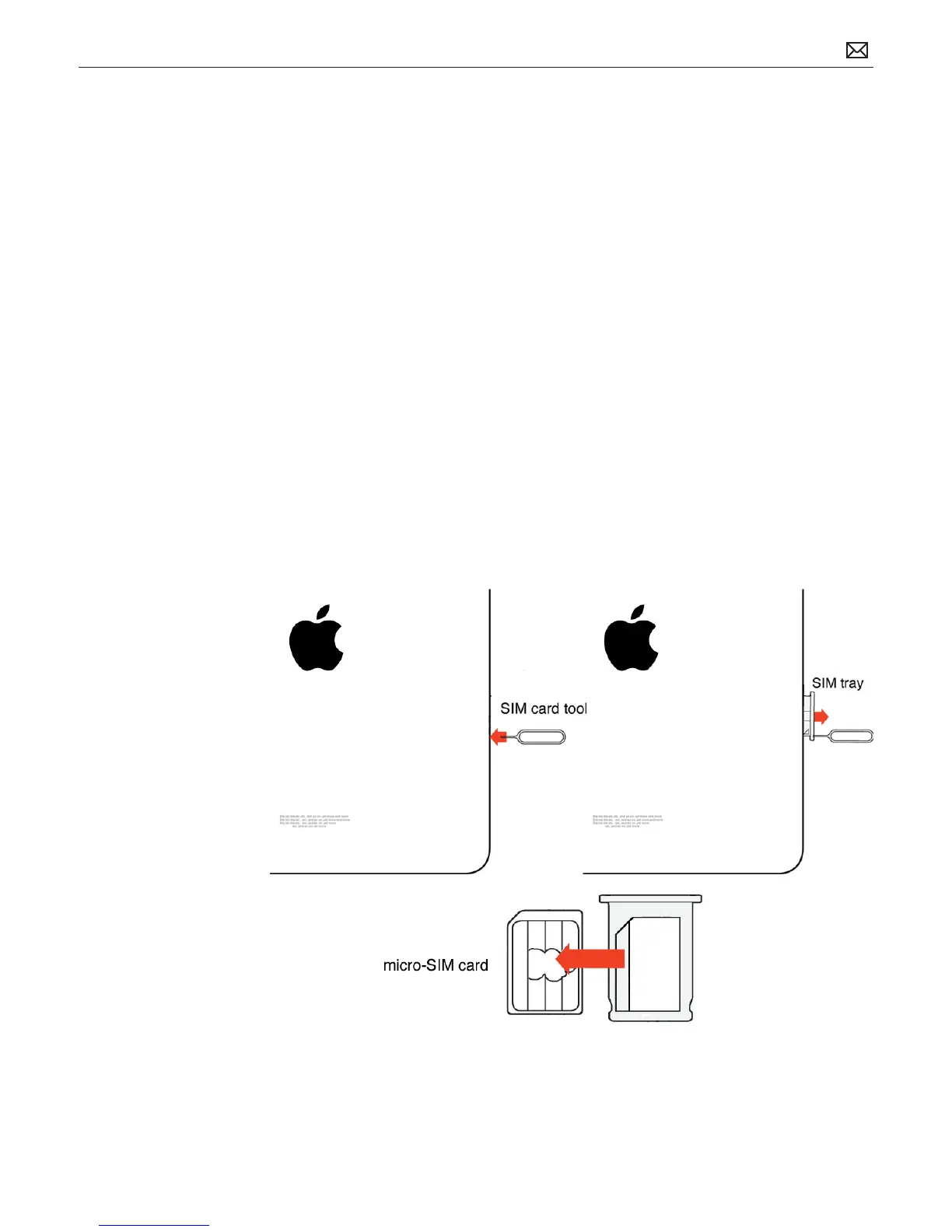
Removing the Micro-SIM Card
When troubleshooting iPad WiFi + 3G connectivity, you may need to remove the micro-SIM
card to check for damage or other issues. To remove the card, do the following:
1. Insert the end of the SIM eject tool into the hole on the SIM tray. Press rmly and push the
tool straight in until the tray pops out. (If you don’t have a SIM eject tool, you can use the
end of a paper clip.)
2. Pull out the SIM tray and remove the micro-SIM card from the tray.



 To Next Page