iPad Basics — Software Information 23
2010-04-30
Set up and Sync Content
Setting up iPad
Before you can use iPad, you must set it up using iTunes:
1. Download and install iTunes 9.1 (or later) from http://www.itunes.com/download.
2. Connect the device to a USB 2.0 port on your Mac or PC using the Dock Connector to USB
cable.
3. Complete the onscreen instructions until iTunes displays the setup dialog.
4. Check or uncheck the checkboxes to automatically sync songs, videos, applications, or
photos to iPad, and then click Done.
Syncing Content
Set up and sync content to iPad in iTunes the same way you would iPhone or iPod touch.
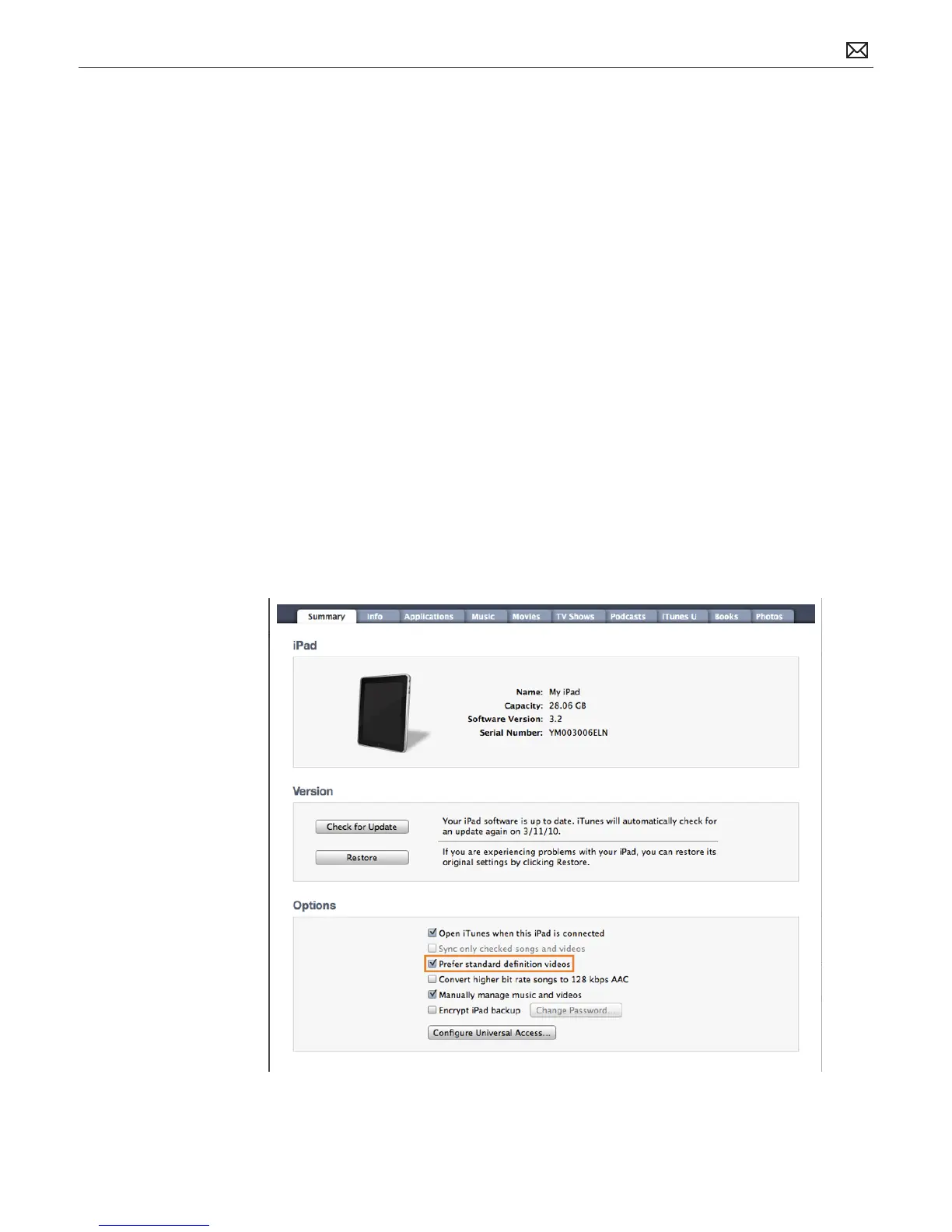
The iTunes Summary (below) and Books pane (next page) contain some dierences that are
exclusive to iPad.
• iTunes Summary pane: Checking “Prefer standard denition videos” on the Summary pane
chooses standard denition over high denition formats when syncing video content to
iPad.



 To Next Page